

On this page
QuickBooks gives SaaS finance teams the accounting data needed to manage the books. But accounting reports and SaaS subscription metrics answer different questions.
QuickBooks can show revenue, expenses, cash flow, invoices, accounts receivable and profitability.
A SaaS metrics dashboard helps answer questions such as:
- What is our current ARR?
- How much MRR did we add this month?
- How much recurring revenue came from expansion?
- How much ARR did we lose through contraction or churn?
- What are our net and gross revenue retention rates?
- Which customers are approaching renewal?
- Which customers expanded, downgraded or cancelled?
- Why did ARR change between two reporting periods?
For B2B SaaS companies using QuickBooks, the challenge is usually not access to accounting data.
The challenge is turning contracts, invoices, renewals, upgrades, downgrades and cancellations into consistent recurring-revenue metrics.
That is where a SaaS metrics dashboard connected to QuickBooks becomes useful.
What Is a SaaS Metrics Dashboard?
A SaaS metrics dashboard tracks the financial and customer movements behind recurring revenue.
Common metrics include:
| Metric | What It Shows |
|---|---|
| ARR | Annualized recurring subscription revenue |
| MRR | Monthly recurring subscription revenue |
| New ARR/MRR | Recurring revenue added from new customers |
| Expansion ARR/MRR | Additional recurring revenue from existing customers |
| Contraction ARR/MRR | Recurring revenue lost from customers that remain active |
| Churned ARR/MRR | Recurring revenue lost when customers cancel or do not renew |
| NRR | Revenue retained after expansion, contraction and churn |
| GRR | Revenue retained before expansion |
| Logo Churn | Percentage of customers lost |
| Bookings | Value of newly contracted business based on the company's definition |
The dashboard should do more than display totals.
Finance teams should also be able to understand which customers and contracts caused those totals to change.
Can QuickBooks Track SaaS Metrics?
QuickBooks Online is primarily an accounting system.
It records financial activity such as:
- Invoices
- Payments
- Revenue
- Expenses
- Accounts receivable
- Cash
- Journal entries
- Customer records
SaaS metrics require additional contract and subscription logic.
Consider a customer that signs a $24,000 annual SaaS agreement.
That single contract may produce:
- ARR: $24,000
- MRR: $2,000
- Invoice: $24,000 if billed annually upfront
- Recognized revenue: Based on the service period and accounting treatment
- Cash: Based on when the customer actually pays
- Renewal: A future contract event
- Expansion: If the customer later increases its subscription
- Contraction: If the subscription value decreases
- Churn: If the customer cancels or does not renew
QuickBooks can record several of the accounting events.
But the recurring-revenue movements require a separate SaaS metrics model.
ARR vs. Revenue in QuickBooks
ARR and accounting revenue are not the same number.
Suppose a SaaS company signs a $24,000 annual subscription starting July 1.
The company might report:
ARR: $24,000
MRR: $2,000
Invoice: $24,000
Revenue recognized in July: Based on the company's revenue-recognition policy and service period
Cash collected: Based on the customer's payment date
Each figure answers a different question.
ARR
ARR represents the annualized recurring value of active subscriptions.
Revenue
Revenue represents what the company has earned during an accounting period.
Billings
Billings represent what the company has invoiced.
Cash
Cash represents what customers have actually paid.
Finance teams should therefore avoid treating QuickBooks revenue, invoice value and ARR as interchangeable figures.
How Do You Calculate ARR?
A simple ARR calculation is:
ARR = MRR × 12
But actual SaaS contracts can make the calculation more complicated.
A company may have:
- Monthly subscriptions
- Annual subscriptions
- Multi-year contracts
- Mid-term upgrades
- Downgrades
- Cancellations
- Renewals
- Implementation fees
- Professional services
- Hardware
- One-time charges
Recurring and non-recurring revenue first need to be separated.
ARR Example
A customer purchases:
- Annual SaaS subscription: $18,000
- Implementation: $3,000
- Training: $2,000
If only the subscription is recurring:
ARR = $18,000
The $5,000 in implementation and training fees should not normally be included in ARR.
The calculation itself is simple.
Maintaining that calculation correctly across hundreds of changing contracts is the harder part.
How Do You Calculate MRR?
MRR converts recurring subscription value into a monthly amount.
For example:
$24,000 annual subscription ÷ 12 = $2,000 MRR
Or:
$6,000 quarterly subscription ÷ 3 = $2,000 MRR
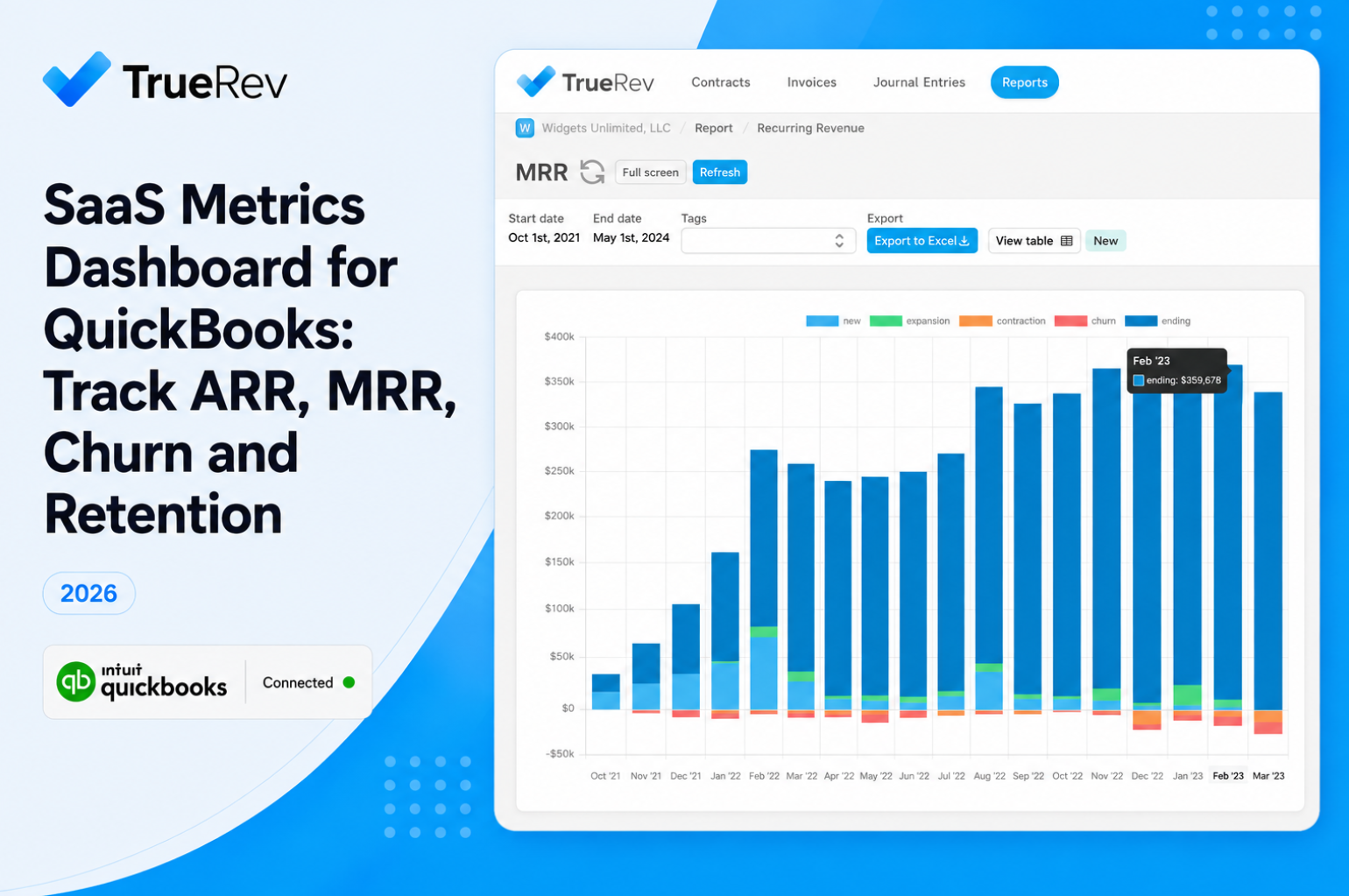
A useful MRR dashboard should also explain how the number moved.
A basic MRR roll-forward is:
Beginning MRR + New MRR + Expansion MRR - Contraction MRR - Churned MRR = Ending MRR
The same approach can be used for ARR.
This allows finance teams to answer a more useful question than simply:
What is our ARR?
They can also answer:
Why did ARR increase or decrease?
What Is Expansion ARR?
Expansion ARR is additional recurring revenue generated from an existing customer.
Examples include:
- Adding more users
- Moving to a higher plan
- Purchasing an additional product
- Increasing usage commitments
- Expanding a contract during renewal
Suppose a customer starts with $30,000 ARR and later increases its subscription to $45,000.
Expansion ARR = $15,000
Expansion should be separated from new-customer ARR because it measures growth within the existing customer base.
What Is Contraction ARR?
Contraction occurs when an existing customer remains active but reduces recurring contract value.
For example:
A customer decreases from:
$50,000 ARR → $35,000 ARR
The company records:
$15,000 contraction ARR
The customer has not churned.
The relationship still exists, but the recurring value has decreased.
Tracking contraction separately helps finance teams understand revenue pressure that may otherwise be hidden inside the total ARR number.
What Is Churned ARR?
Churned ARR represents recurring revenue lost when a customer cancels or fails to renew.
For example:
A customer worth $20,000 ARR cancels at renewal.
Churned ARR = $20,000
Churn should normally be tracked separately from contraction.
This makes retention reporting much easier to explain.
What Is Net Revenue Retention?
Net Revenue Retention measures how recurring revenue from an existing customer base changes after expansion, contraction and churn.
A common formula is:
NRR = (Starting ARR + Expansion - Contraction - Churn) ÷ Starting ARR × 100
NRR Example
Starting ARR: $1,000,000
Expansion: $150,000
Contraction: $50,000
Churn: $75,000
Calculation:
($1,000,000 + $150,000 - $50,000 - $75,000) ÷ $1,000,000
NRR = 102.5%
The existing customer base grew despite contraction and churn because expansion more than replaced the lost recurring revenue.
What Is Gross Revenue Retention?
Gross Revenue Retention excludes expansion.
A common formula is:
GRR = (Starting ARR - Contraction - Churn) ÷ Starting ARR × 100
Using the same example:
($1,000,000 - $50,000 - $75,000) ÷ $1,000,000
GRR = 87.5%
NRR and GRR should usually be viewed together.
GRR tells you: How much recurring revenue did we retain without upsells?
NRR tells you: What happened after expansion was included?
A company can have strong NRR while still losing significant revenue through churn and contraction.
GRR helps expose that difference.
How Should SaaS Companies Track Customer Churn?
Churn can be measured in more than one way.
Logo Churn
Logo churn measures customers lost.
Logo Churn = Customers Lost ÷ Customers at Start of Period
Revenue Churn
Revenue churn measures recurring revenue lost.
A company might lose several small customers but retain most of its ARR.
Another company might lose one major customer and experience significant revenue churn despite low logo churn.
Tracking both provides a clearer view of retention.
How Does Customer Health Connect to SaaS Metrics?
There is no universal customer-health formula.
But finance teams can use recurring-revenue activity to identify changes in customer relationships.
Useful signals include:
- Contract value
- Renewal date
- Expansion history
- Contraction history
- Churn status
- Subscription changes
- Billing status
- Payment status where relevant
- Product or seat changes
For example:
A customer that expanded from $25,000 ARR to $45,000 ARR shows a very different pattern from a customer that has contracted twice before renewal.
The goal does not have to be creating a single customer-health score.
It can simply be making the financial history of each customer easier to understand.
Why SaaS Metrics Become Difficult to Manage in Spreadsheets
Spreadsheets can work well during the early stages of a SaaS company.
A common process looks something like this:
- Export invoice data from QuickBooks.
- Maintain customer and contract information in another sheet.
- Identify recurring and non-recurring charges.
- Normalize contract values into ARR and MRR.
- Record new customers.
- Track upgrades and downgrades.
- Record cancellations.
- Calculate retention.
- Build ARR waterfalls.
- Reconcile the spreadsheet before monthly reporting.
The problem is not the spreadsheet itself.
The problem is that the spreadsheet gradually becomes another financial data system.
Finance then has to keep several sources aligned:
- QuickBooks
- Contracts
- CRM records
- Billing data
- Renewal information
- SaaS metrics spreadsheets
A missed contract update can change ARR.
A downgrade that never reaches the spreadsheet can overstate recurring revenue.
A cancelled customer left active can understate churn.
As contract volume grows, maintaining a reliable view becomes harder.
Can SaaS Metrics Be Calculated From QuickBooks Invoices Alone?
Not always.
An invoice may tell you:
- Customer
- Invoice amount
- Products
- Billing date
- Payment terms
But ARR and MRR may also depend on:
- Contract start date
- Contract end date
- Renewal date
- Recurring vs. non-recurring classification
- Amendment dates
- Upgrade terms
- Downgrade terms
- Cancellation date
- Future committed value
Consider two $12,000 invoices.
One could represent:
A one-year subscription
The other could represent:
A one-time implementation project
The accounting amount is the same.
The ARR impact is completely different.
This is why SaaS metrics often need contract information in addition to QuickBooks data.
Three Ways to Track SaaS Metrics With QuickBooks
1. QuickBooks + Spreadsheets
This is often the simplest starting point.
It can work when:
- Customer count is manageable
- Contracts are straightforward
- Pricing changes are limited
- Finance can maintain the model consistently
- Reporting requirements remain relatively simple
Main limitation: The process requires manual maintenance and reconciliation.
2. QuickBooks + BI or Reporting Software
A BI tool can combine QuickBooks data with CRM, billing or other systems.
This approach can work when:
- The business already has reliable underlying data
- Reporting requirements are highly customized
- Someone owns the data model
- Metric definitions are clearly documented
- Multiple systems need to feed management reporting
Main limitation: The company still needs to build and maintain the subscription logic behind ARR, MRR and retention.
3. QuickBooks + a SaaS Finance Platform
A SaaS finance platform adds contract and recurring-revenue logic around the accounting data.
This approach becomes more relevant when:
- QuickBooks remains the general ledger
- ARR and MRR are maintained outside QuickBooks
- Contract changes happen frequently
- Finance needs expansion, contraction and churn reporting
- Retention reporting requires significant manual work
- Revenue recognition also depends on contract data
- Several finance processes rely on the same contracts
The key difference is that the platform can treat contracts and recurring-revenue events as finance data rather than relying only on individual invoices.
What Should You Look for in a SaaS Metrics Dashboard?
A good SaaS metrics dashboard should help finance explain the numbers, not only display them.
1. Clear Metric Definitions
The organization should have consistent definitions for:
- ARR
- MRR
- New business
- Expansion
- Contraction
- Churn
- GRR
- NRR
- Bookings
Different definitions across finance, sales and leadership create reporting problems regardless of the software being used.
2. Customer-Level Traceability
Finance should be able to move from:
Total ARR
to:
Customer
to:
Contract
to:
The event that changed the number
This makes reporting easier to review and explain.
3. ARR and MRR Roll-Forwards
A useful dashboard should show:
Beginning recurring revenue
- New
- Expansion
- Contraction
- Churn
= Ending recurring revenue
A single ARR total cannot explain what happened during the period.
4. Contract Events
The system should make events such as these visible:
- New contracts
- Renewals
- Upgrades
- Downgrades
- Cancellations
- Extensions
5. Contract Dates
Metrics should reflect relevant contract dates rather than relying only on invoice dates.
6. QuickBooks Connectivity
Ask exactly what data moves between QuickBooks and the SaaS metrics system.
Questions should include:
- Which QuickBooks records are used?
- Which system owns contract data?
- How are invoices connected with contracts?
- How are journal-related processes handled?
- What controls exist around data synchronization?
"Integrates with QuickBooks" is not enough information by itself.
7. Revenue Recognition Context
If the finance team also handles revenue recognition, ask whether SaaS metrics and revenue schedules use the same contract information.
Maintaining separate contract records for ARR and revenue recognition can recreate the same manual work in different spreadsheets.
How TrueRev Supports SaaS Metrics for QuickBooks Users
TrueRev is focused on B2B SaaS finance teams using QuickBooks Online.
Its product scope includes recurring-revenue metrics such as:
TrueRev also supports related finance workflows, including:
- Contract management
- Contract renewals and events
- Revenue recognition
- Deferred revenue
- Revenue schedules
- Scheduled invoices
- Journal entries
- Shared reporting
- Document management
This matters because SaaS metrics rarely exist in isolation.
The same contract change can affect several finance processes.
Example: Customer Upgrade
A customer upgrade may affect:
- ARR
- MRR
- Expansion
- Future invoices
- Contract value
- Revenue schedules
Example: Customer Cancellation
A cancellation may affect:
- ARR
- MRR
- Churn
- Retention
- Future billing
- Contract status
- Revenue schedules
When those processes rely on the same contract data, finance has less need to recreate the change across several files.
How TrueRev Works With QuickBooks
TrueRev connects with QuickBooks Online while QuickBooks remains the accounting system.
The current TrueRev product scope references QuickBooks-related accounting data including:
- Customers
- Invoices
- Chart of accounts
- Journal-entry workflows
- Related accounting information
TrueRev adds contract, revenue and SaaS reporting processes around that accounting environment.
Companies evaluating any QuickBooks-connected finance platform should still confirm the exact records, synchronization direction and approval controls required for their own process.
When Should You Move Beyond a SaaS Metrics Spreadsheet?
There is no universal ARR threshold where spreadsheets stop working.
A better trigger is operational complexity.
It may be time to review another approach when:
- ARR requires repeated manual reconciliation.
- Finance and sales report different recurring-revenue totals.
- Renewals are missed during reporting.
- Upgrades and downgrades are difficult to reconstruct.
- Monthly or board reporting requires significant spreadsheet preparation.
- Finance cannot quickly explain why ARR changed.
- Contracts and invoice dates frequently differ.
- The same subscription data is maintained in several systems.
- Revenue recognition and SaaS metrics rely on separate contract records.
- Reporting depends heavily on one person maintaining the model.
- Churn or retention calculations have to be rebuilt before each reporting cycle.
A spreadsheet can still be the right tool.
The question is whether it remains the most reliable way to maintain the company's recurring-revenue reporting.
QuickBooks vs. SaaS Metrics Dashboard: What Belongs Where?
| Finance Question | QuickBooks | SaaS Metrics Dashboard |
|---|---|---|
| How much revenue did we recognize? | Yes | May reference |
| What invoices are outstanding? | Yes | May reference |
| What is our current ARR? | Limited | Yes |
| What is our current MRR? | Limited | Yes |
| How much ARR came from new customers? | Limited | Yes |
| How much ARR came from expansion? | Limited | Yes |
| How much ARR contracted? | Limited | Yes |
| How much ARR churned? | Limited | Yes |
| What is our NRR? | Limited | Yes |
| What is our GRR? | Limited | Yes |
| Which customers changed contract value? | Partial | Yes |
| Why did ARR change this month? | Limited | Yes |
| What recurring revenue is approaching renewal? | Limited | Yes |
QuickBooks and a SaaS metrics system do not have to compete with each other.
They answer different parts of the finance process.
Frequently Asked Questions
Can QuickBooks Online calculate ARR?
QuickBooks contains accounting and invoice data that may contribute to an ARR calculation, but ARR requires recurring-revenue classification and contract logic. SaaS companies commonly calculate ARR separately through spreadsheets, reporting tools or SaaS finance software.
Can QuickBooks calculate MRR?
QuickBooks can provide invoice and customer information used in an MRR calculation. However, MRR requires recurring amounts to be normalized across contract periods and adjusted for upgrades, downgrades, cancellations and other subscription events.
What is the difference between ARR and revenue?
ARR represents the annualized recurring value of active subscriptions. Revenue represents what has been earned during an accounting period. A company can therefore have ARR that is materially different from recognized revenue.
What is the difference between ARR and bookings?
ARR represents recurring subscription value. Bookings generally represent newly contracted business during a period. Companies should define bookings consistently because the exact treatment may differ between organizations.
Should implementation fees be included in ARR?
Generally, one-time implementation, training, consulting or hardware charges should not be included in ARR when they are not recurring subscription revenue.
What is the difference between NRR and GRR?
GRR measures recurring revenue retained after contraction and churn without counting expansion. NRR also includes expansion from existing customers.
What is the difference between churn and contraction?
Churn occurs when recurring revenue is lost because a customer leaves or does not renew. Contraction occurs when a customer remains active but reduces its recurring contract value.
Can SaaS metrics be calculated from invoices alone?
Not always. Reliable ARR, MRR and retention reporting may also require contract dates, renewal information, recurring classifications, amendments, upgrades, downgrades and cancellations.
What SaaS metrics should finance teams track?
Common finance-focused metrics include ARR, MRR, new recurring revenue, expansion, contraction, churn, NRR, GRR, bookings and customer counts. The exact set depends on the company's business model and reporting needs.
How often should SaaS metrics be updated?
At minimum, finance teams usually need reliable period-end metrics for monthly reporting. Companies with frequent contract changes may also benefit from more frequent reporting on new business, expansion, contraction and churn.
Does TrueRev replace QuickBooks?
No. TrueRev is designed to work alongside QuickBooks Online. QuickBooks remains part of the accounting environment while TrueRev supports SaaS-specific contract, revenue and recurring-revenue processes.
Track SaaS Metrics Without Rebuilding the Numbers Every Month
QuickBooks remains a strong accounting system for many B2B SaaS companies.
The reporting gap appears when finance also needs to understand recurring-revenue movements across contracts.
ARR, MRR, expansion, contraction, churn, NRR, GRR and bookings require more than a total from the general ledger.
Finance needs to know:
- What changed
- Which customers caused the change
- Which contracts were affected
- How the movement impacts recurring revenue
For smaller companies, spreadsheets may continue to work well.
As the number of contracts, amendments and reporting requirements increases, connecting SaaS metrics with the underlying contract and accounting data can make those numbers easier to maintain, review and explain.
See how TrueRev works with QuickBooks for SaaS metrics, contracts, revenue schedules and related finance workflows.
Using QuickBooks for B2B SaaS finance? Schedule a Demo to see how TrueRev connects contracts, revenue, and SaaS metrics.
Want to see a demo?
we offer a 14-day free trial.