
Deferred Revenue Accounting Software for SaaS
Stop rebuilding deferred revenue in Excel every month. TrueRev builds a revenue schedule for every contract from your QuickBooks Online customers and invoices, so deferred and recognized revenue stay current as your customer base grows.

What is deferred revenue?
Deferred revenue is money a customer has paid, or been invoiced, for a product or service you have not delivered yet. It sits on your balance sheet as a liability and moves into recognized revenue as you deliver, which for SaaS usually means month by month over the subscription term.
From invoice to deferred revenue
Sync customers and invoices
Connect QuickBooks Online and bring in your customers and invoices.
Build the revenue schedule
TrueRev builds a schedule for each contract. See revenue recognition for the supported methods.
Track deferred and recognized revenue
Balances are calculated and maintained as each period passes.
Review by customer, product or contract
See the numbers in the view your finance team needs.
Deferred revenue example: a $12,000 annual subscription
A customer pays $12,000 up front for a 12-month subscription. On day one, all $12,000 is deferred revenue, a liability on your balance sheet. Each month, $1,000 moves into recognized revenue.
| When | Recognized revenue | Deferred revenue |
|---|---|---|
| Day one | $0 | $12,000 |
| After month 1 | $1,000 | $11,000 |
| After month 3 | $3,000 | $9,000 |
| After month 6 | $6,000 | $6,000 |
| After month 12 | $12,000 | $0 |
Illustrative example, not customer data. Now multiply it by every contract, upgrade and cancellation you manage. TrueRev builds and maintains these schedules for you.
Automate deferred revenue
TrueRev connects with QuickBooks Online in minutes, and imports closed-won deals from HubSpot. By syncing customers and invoices from QuickBooks, TrueRev calculates and maintains deferred revenue and lets you leave the mess of spreadsheets behind.


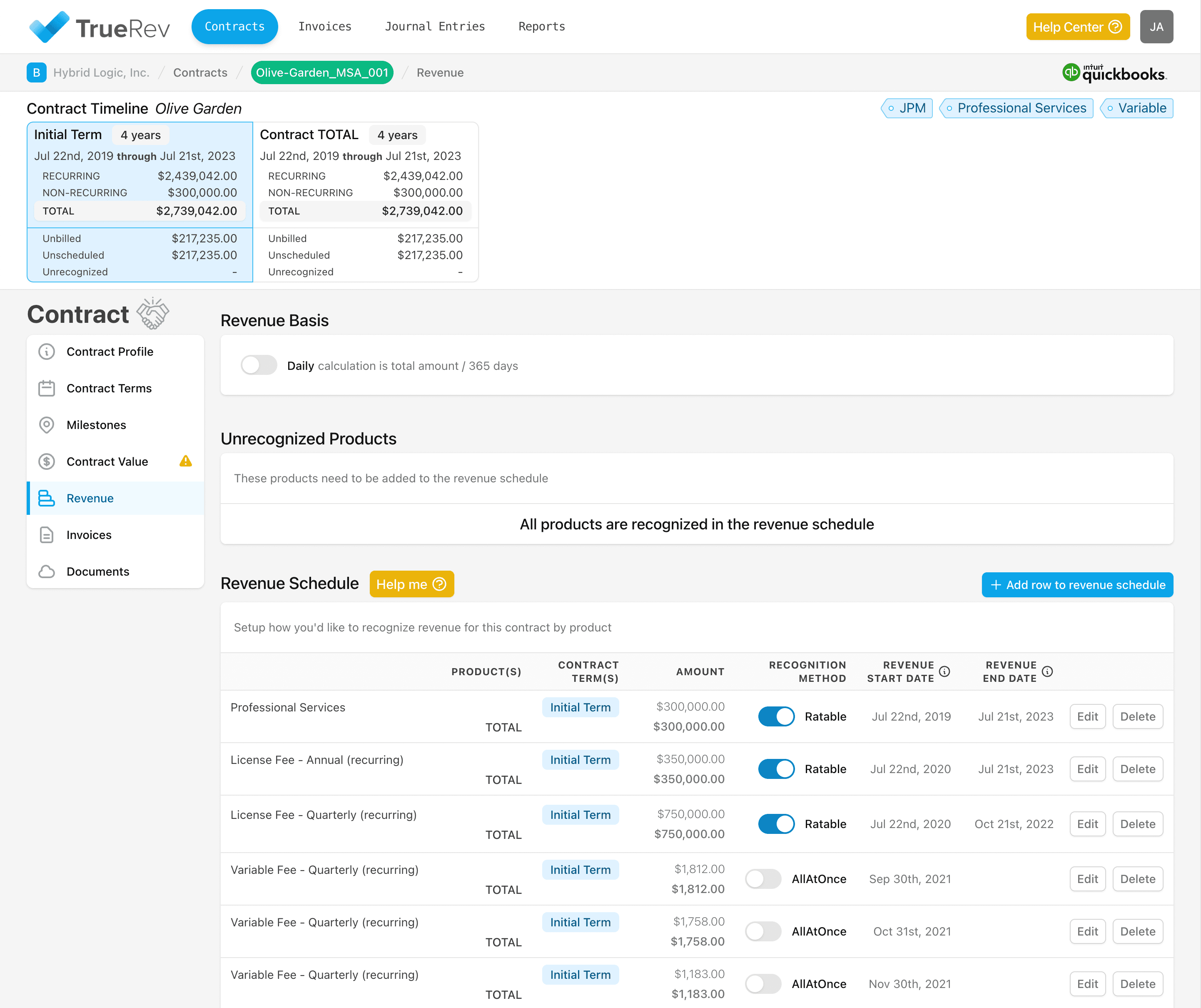
Deferred revenue by customer, product or contract
See deferred and recognized revenue by customer, product or contract, in one place. Your CRM tracks deals. TrueRev tracks the revenue schedules behind them, so finance can answer "how much is still deferred?" without opening a spreadsheet.

Features
Move your revenue schedules off of Exceland eliminate multiple spreadsheets, manualerrors and version control.
Simply account for your monthly revenue and the deferred balance.
Keep track of all agreements even in a fast paced SaaS environment.
Move your revenue schedules off of Excel and eliminate multiple spreadsheets, manual errors and version control. Stay compliant with ASC 606.
Generate subscription metrics in minutes instead of days (MRR/ARR, Bookings, Churn, Cash-flow).
New deals, upgrades, cancellations, expansion - all tracked easily and accurately.
Deferred revenue in Excel, QuickBooks Online Advanced and TrueRev
| Excel | QuickBooks Online Advanced | TrueRev | |
|---|---|---|---|
| Deferred revenue entries | Calculated and entered by hand | Automatically tracked and entered, per Intuit | Calculated and maintained from synced customers and invoices |
| Plan required | None | Advanced plan only | Works with QuickBooks Online. See the pricing page |
| View by customer, product or contract | Built by hand | See Intuit's documentation | Yes |
| Versions and errors | Multiple files and manual errors | One system | One platform |
Related: TrueRev for QuickBooks Online and the HubSpot integration.
What our customers are saying


Deferred revenue questions, answered
How do you track deferred revenue?
For each contract, record the amount invoiced, then spread it across the service period with a schedule. Each period, an amount moves from the deferred revenue liability to recognized revenue. Spreadsheets work at small scale. Software automates it as contracts grow.
How do I automate deferred revenue schedules?
Use software that builds a schedule from each contract and invoice. TrueRev does this for B2B SaaS by syncing customers and invoices from QuickBooks Online. QuickBooks Online Advanced can also track and enter deferred revenue automatically, on the Advanced plan.
Is deferred revenue a liability?
Yes. Until you deliver what the customer paid for, deferred revenue is recorded as a liability on the balance sheet. It becomes revenue as you deliver.
What is the difference between deferred revenue and unearned revenue?
They usually mean the same thing: payment received or invoiced before the product or service is delivered. Your accountant can confirm the terms used in your books.
Can I see deferred and recognized revenue by customer or contract?
Yes. TrueRev shows deferred and recognized revenue by customer, product or contract.
How much does TrueRev cost?
See the pricing page for current plans. A 14-day free trial is available.
Want to see a demo?
we offer a 14-day free trial.