
Contract-to-cash for B2B SaaS
Contract-to-Cash Software for B2B SaaS on QuickBooks Online
From the day a contract is signed to the month its revenue is recognized, TrueRev keeps one contract record behind your scheduled invoices, deferred revenue and revenue schedules. Your books stay in QuickBooks Online.
A 14-day free trial is available. Official QuickBooks Partner. Intento closes its books in 2 days instead of 10.
What is contract-to-cash software?
Contract-to-cash software handles the finance work that begins when a customer signs: recording the contract terms, scheduling invoices, collecting payment and recognizing revenue. It replaces the spreadsheet that currently connects those steps.
In many B2B SaaS finance teams, one contract ends up in several places: the signed agreement, a billing spreadsheet, QuickBooks and a revenue schedule. When a customer upgrades or renews, each copy needs its own update, and the numbers drift apart until month-end.
Contract-to-cash, quote-to-cash and order-to-cash
| Process | Starts at | Main focus |
|---|---|---|
| Contract-to-cash | A signed customer agreement | Billing, payment, revenue and reporting after signature |
| Quote-to-cash | Pricing or a quote | Sales configuration through finance |
| Order-to-cash | A confirmed order | Invoicing and receivables |
TrueRev focuses on the finance side after signature. If you are comparing vendors, read our contract-to-cash software comparison.
How TrueRev automates the contract-to-cash workflow
Step 1
Record the contract
Add the products, dates, prices and discounts for each deal, or import closed-won deals from HubSpot.
Step 2
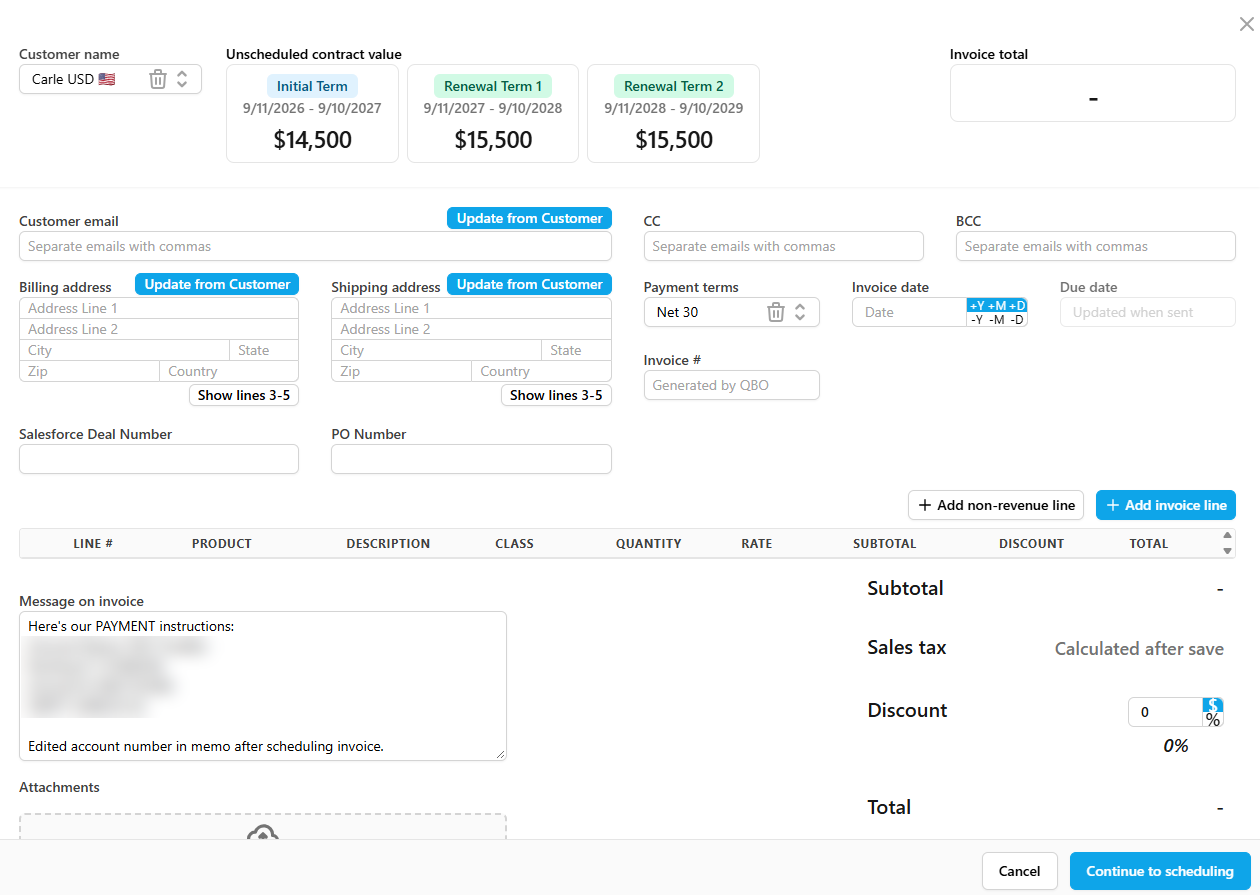
Schedule the billing
Set monthly, quarterly or annual billing from the contract, so billing follows the agreement instead of a separate spreadsheet.
Step 3
Send the invoice
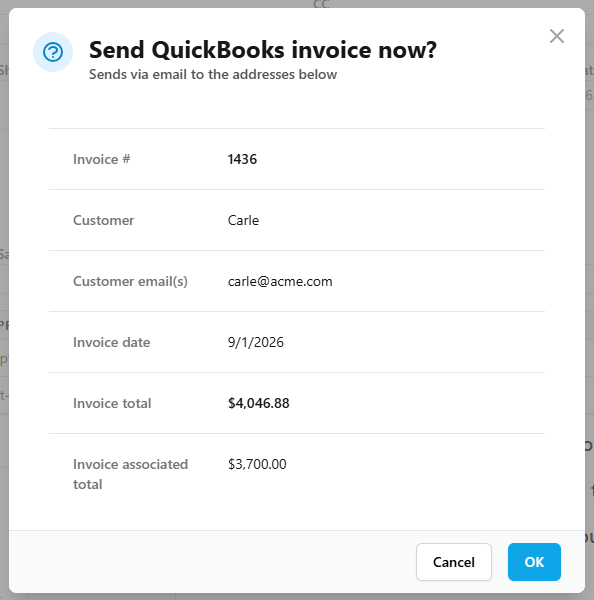
Choose auto-send on a set date, a reminder to review and send it yourself, or send it now. Invoices sync to QuickBooks Online and appear in the customer’s invoice list.
Step 4
Get paid
Turn on ACH and card payments, and customers can pay from a Pay Now button in the invoice email.
Step 5
Track the revenue
The same contract feeds deferred revenue, revenue schedules, journal entries and ARR and MRR reporting.
Bring a real contract to the demo.
One contract, from signature to renewal
Here is how a single contract moves through the workflow. The example is a $24,000 annual contract, billed quarterly, with revenue recognized evenly over 12 months.
| When | What happens in TrueRev | What finance sees |
|---|---|---|
| Day 1 | The contract is recorded with a quarterly billing schedule | Four invoices of $6,000 scheduled |
| Day 1 | The first invoice is sent and syncs to QuickBooks Online | $6,000 billed |
| End of month 1 | The revenue schedule recognizes the first month | $2,000 recognized, $4,000 of the invoice still deferred |
| Month 6 | The customer upgrades | The upgrade is recorded as a contract event on the same contract |
| Month 12 | The renewal date arrives | The renewal is tracked on the contract, so the date is not missed |
Illustrative example, not customer data. Which recognition method applies, and how an upgrade is treated, is a decision for you and your accountant.
One contract record from deal to revenue
From a HubSpot deal to a QuickBooks-ready contract
When a deal closes in HubSpot, TrueRev imports it from the pipeline you choose and keeps importing new deals after setup. It suggests the matching QuickBooks customer and products, and your finance team confirms them before a contract is created. Nothing books itself. See the HubSpot integration.
Contract changes and renewals
Upgrades, cancellations, expansions and renewals are recorded as contract events next to the billing schedule, so a billing change starts from the contract change itself. Renewal dates live on the contract record, so finance can see which renewals are coming up instead of tracking dates in a calendar or a spreadsheet.
Billing connected to revenue
The invoice date and sent status affect when an amount enters the deferred revenue balance. The revenue schedule report shows recognized, deferred and unbilled totals by contract, and journal entries are prepared for QuickBooks Online. ARR, MRR, churn and retention come from the same contract data, so finance does not reconcile billing against a separate schedule. See revenue recognition.
Spreadsheets and QuickBooks alone vs. TrueRev
| Step | Spreadsheets and QuickBooks alone | With TrueRev |
|---|---|---|
| Contract terms | Spread across agreements and spreadsheets | One contract record |
| Billing schedule | Kept by hand, then re-keyed into QuickBooks | Created from the contract |
| Invoices | Created one at a time | Scheduled from the contract and synced to QuickBooks Online |
| Upgrades and renewals | Edited by hand in each file | Recorded as contract events |
| Deferred revenue | Reconciled against invoices at month-end | Moves with invoice dates on the same contract |
| ARR and MRR | Compiled by hand | Reported from the same contract data |
Five questions to ask any contract-to-cash vendor
1. Does it read signed agreements, or does finance enter the terms?
Some tools read agreements automatically. TrueRev works from structured contract terms that finance enters or imports from HubSpot, with a review step before a contract is created.
2. Which accounting system holds the books, and what data moves?
TrueRev is built for QuickBooks Online. Customers, invoices and your chart of accounts connect, invoices created in TrueRev sync to QuickBooks, and journal entries are prepared for review.
3. How are upgrades, cancellations and renewals handled?
Ask whether they start from the contract or from a separate edit. In TrueRev they are recorded as contract events next to the billing schedule.
4. Does it cover collections, or only invoicing and payment links?
TrueRev sends invoices and supports ACH and card payments from the invoice email. It is not a dedicated collections platform.
5. What does it cost, and how long does setup take?
Plans are published on the pricing page, and a 14-day free trial is available. Connecting QuickBooks Online takes minutes. Loading contracts depends on how many you have.
Fit
Who TrueRev fits, and who should look elsewhere
Not sure which side you are on? Bring your process to a demo and we will say plainly whether TrueRev fits.
TrueRev fits when
You are a B2B SaaS company on QuickBooks Online. Contracts have custom terms, upgrades and renewals. Billing and revenue schedules live in spreadsheets. You want one contract record that feeds billing, revenue and reporting, and you want to keep QuickBooks as your ledger.
Look at other options when
Your priority is dedicated collections and dunning automation. Your billing depends on usage metering or self-serve checkout. You run an enterprise-scale finance stack across several systems.
Keep QuickBooks as your ledger
TrueRev is built for B2B SaaS companies on QuickBooks Online, and it is an official QuickBooks Partner. You can connect QuickBooks Online in minutes. QuickBooks stays your accounting system. TrueRev adds contracts, billing schedules, deferred revenue and SaaS metrics around it. See the QuickBooks Online integration.
What finance teams say


Comparing contract-to-cash tools?
See how TrueRev compares with Tabs, Maxio, Chargebee and Zuora, or read the full contract-to-cash software comparison.
Contract-to-cash questions
Can I import deals from HubSpot?
Yes. TrueRev imports deals from the HubSpot pipelines you choose, suggests the matching QuickBooks customer and products, and your finance team confirms them before a contract is created. Contracts created this way can be filtered as HubSpot-sourced.
Can I move over from spreadsheets or another billing tool?
Our team has handled migrations from Maxio, Tabs and spreadsheet setups, including contract data import, credit memo history and revenue schedule alignment. If you have already invoiced customers in QuickBooks, you can create a contract in TrueRev that includes those invoices.
Does TrueRev replace QuickBooks?
No. QuickBooks stays your accounting system. TrueRev adds the contract record, billing schedules, deferred revenue and SaaS metrics, and connects to QuickBooks Online.
Does contract-to-cash software handle revenue recognition?
In TrueRev, the same contract that drives billing also builds the revenue schedule and deferred revenue balance. Your accountant decides how revenue is treated, and TrueRev applies that policy. See revenue recognition.
How long does setup take, and what does it cost?
Connecting QuickBooks Online takes minutes, and loading contracts depends on how many you have. A 14-day free trial is available, and current plans are on the pricing page.
See your contracts run from signature to revenue
Bring a real contract, or a closed-won HubSpot deal, to the demo. A 14-day free trial is available.