
Billing for B2B SaaS on QuickBooks Online
SaaS Billing Software
Bill From Contracts, Not Spreadsheets
TrueRev turns your contracts into scheduled invoices in QuickBooks Online and keeps your invoices connected to deferred revenue and revenue schedules. Built for B2B SaaS finance teams.
14-day trial available.
TrueRev billing at a glance
What it is
Billing and revenue management software for B2B SaaS
Built for
B2B SaaS controllers, accounting managers and fractional CFO firms using QuickBooks Online
Billing
Monthly, quarterly and annual recurring billing schedules created from contracts
Works with
QuickBooks Online and HubSpot
Also includes
Deferred revenue, revenue schedules, contract renewals, journal entries and SaaS metrics (MRR, ARR, churn, retention)
Trial
14 days
Why SaaS billing outgrows spreadsheets and recurring templates
QuickBooks handles standard invoicing well. SaaS billing adds custom contract terms, multi-year deals, upgrades, renewals and different billing frequencies. When those details live in spreadsheets, finance rebuilds the same information in several places.
Billing schedules kept by hand.
Invoice dates and amounts are tracked per contract, then re-keyed into QuickBooks.
Templates that repeat, contracts that change.
Recurring invoice templates run on a schedule. When a contract is upgraded, renewed or cancelled, someone has to update the billing to match.
Billing and revenue drift apart.
When invoices and revenue schedules are maintained separately, they have to be reconciled at month-end.
TrueRev billing
What is TrueRev's SaaS billing software?
TrueRev is billing and revenue management software for B2B SaaS finance teams that use QuickBooks Online. You create billing schedules and invoices from your contracts in TrueRev. Invoices sync to QuickBooks Online, and the same contract records feed your deferred revenue, revenue schedules and SaaS metrics.
It supports the contract-to-cash workflow for B2B SaaS, from signed contract to invoice to recognized revenue.
TrueRev works alongside QuickBooks. It doesn't replace it.
- 01Contract↓
- 02Billing schedule↓
- 03Invoice↓
- 04QuickBooks Online↓
- 05Deferred revenue and revenue schedule
What you can do with TrueRev billing
Set up recurring billing schedules from contracts
Set up monthly, quarterly or annual recurring billing for each customer contract. Billing follows the contract instead of a separate spreadsheet.
Schedule SaaS invoices, or send them now
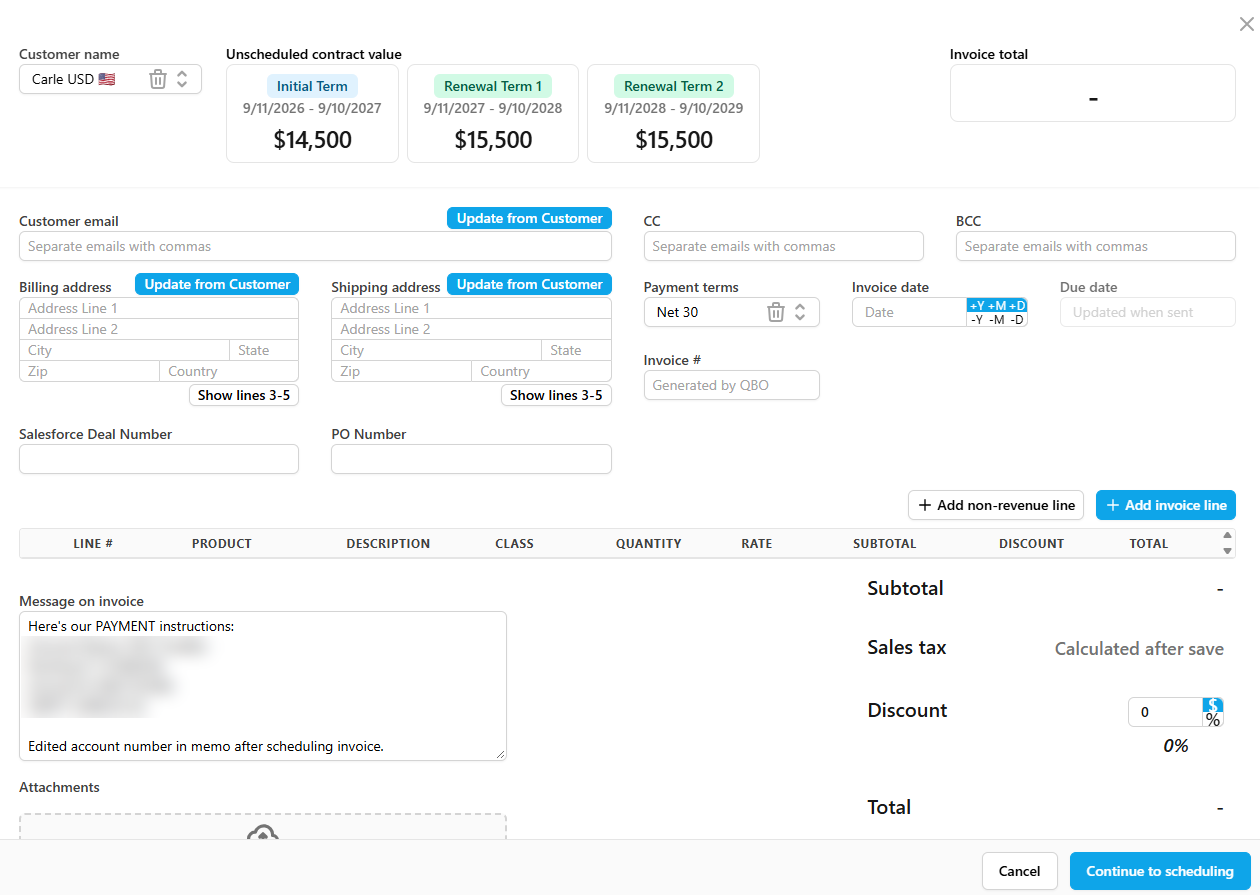
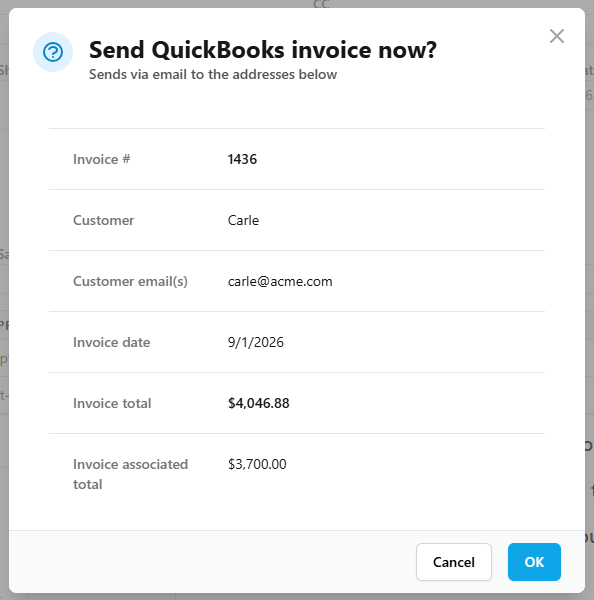
For each invoice, choose auto-send on a set date, a reminder to review and send it yourself, or send immediately. You decide how much control each invoice gets.
Send invoices through QuickBooks Online
Invoices created in TrueRev sync to QuickBooks and appear in the customer's invoice list. QuickBooks stays your accounting system, and your records stay in one place.
Fit invoices to your process
Add an invoice number prefix, default CC and BCC addresses, a message on the invoice and attachments. Map TrueRev contract fields to QuickBooks invoice custom fields to prefill them. Turn on ACH and credit card payments, and customers can pay from a "Pay Now" button in the invoice email.
Manage contract changes: upgrades, cancellations, expansions and renewals
Contract events are recorded in TrueRev alongside the billing schedule, so billing changes start from the contract change itself.
Billing software connected to revenue recognition
The invoice date and sent status affect when an amount enters the deferred revenue balance. The revenue schedule report shows recognized, deferred and unbilled totals by contract. Because contract and revenue data sit in one platform, you can also report MRR, ARR, churn and retention. Finance works from one set of contract records instead of reconciling billing against a separate schedule.
Purpose-built for the finance teams and fractional CFOs actually doing the work
TrueRev fits into the workflows of B2B SaaS controllers, accounting managers, and the fractional CFO firms that serve them.
How SaaS billing works in TrueRev
Step 01
Connect QuickBooks Online
Link your QuickBooks account so customers, products and accounts are available in TrueRev.
Step 02
Add the contract
Add the products being sold, with start and end dates, price, quantity and any discounts.
Step 03
Create and schedule the invoice
Add line items and a message, then choose auto-send, a reminder, or send now.
Step 04
The invoice syncs to QuickBooks
The invoice is emailed to the customer and synced to QuickBooks. Deferred revenue and the revenue schedule are updated from the same contract.
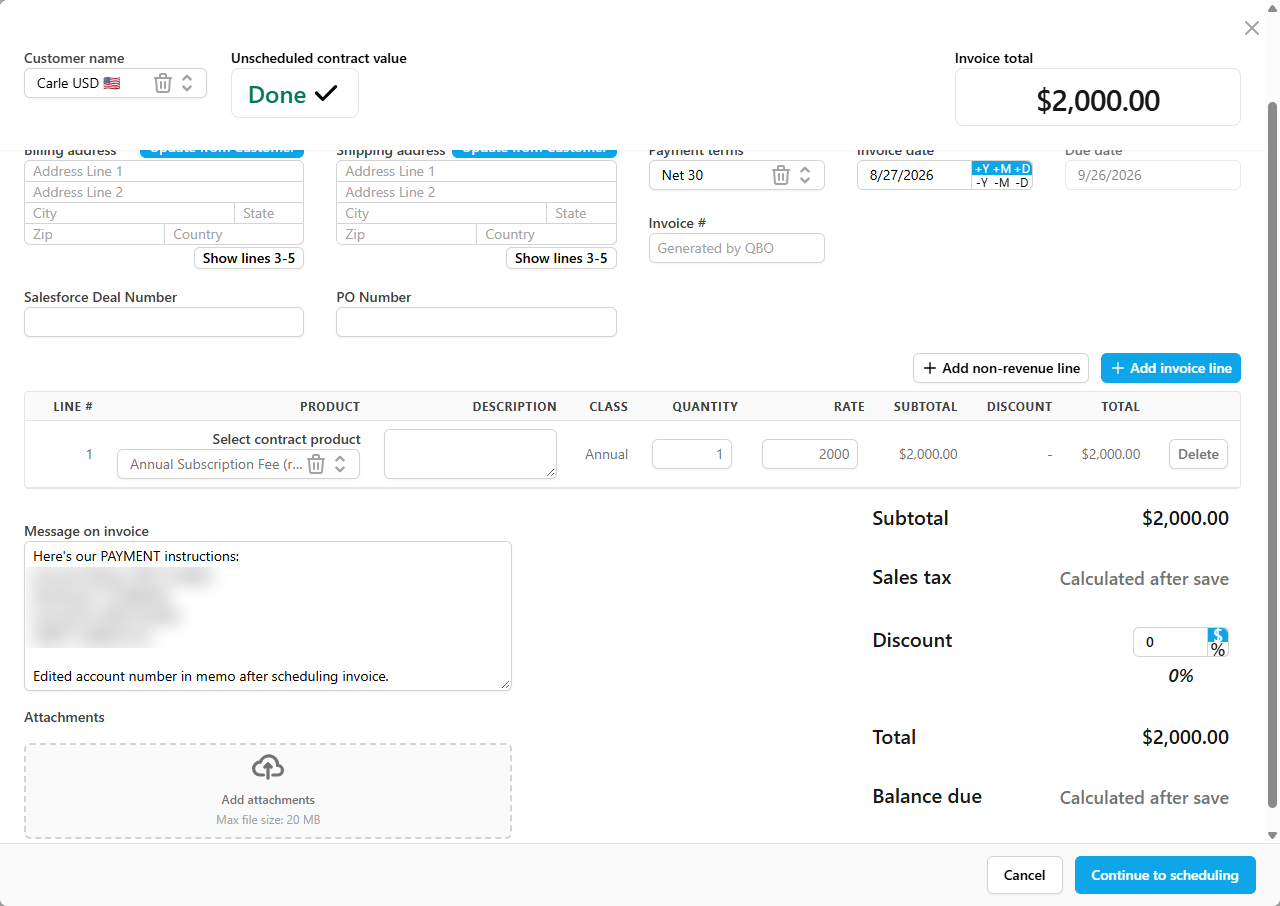
Already invoiced customers in QuickBooks? You can create a contract in TrueRev that includes invoices you've already sent.
Migration
Migrating from Maxio, Tabs, or spreadsheets?
Our team has done migrations from Maxio, Tabs, and complex spreadsheet setups. We handle contract data import, credit memo history, and revenue schedule alignment so your books stay clean through the switch.
Contract data import
Credit memo history
Revenue schedule alignment
What our customers are saying


TrueRev compared with other ways to bill SaaS customers
| Option | May fit when | Consider something else when |
|---|---|---|
| QuickBooks recurring invoices | You bill consistent amounts on a set schedule. QuickBooks Online Advanced also includes native revenue recognition that can cover simple, invoice-based schedules. | Contracts change often, or billing needs to tie to contract-level revenue schedules. |
| Spreadsheets + QuickBooks | Contracts are few and terms are simple. | Contract volume grows and versions multiply. |
| TrueRev | You're a B2B SaaS company on QuickBooks Online and want contract-based billing connected to deferred revenue and revenue schedules. | Your billing depends on self-serve checkout, payment-gateway management or usage metering. Ask our team whether TrueRev fits. |
| Full subscription billing platforms (for example Chargebee, Maxio, Zuora) | You need broader monetization tools such as checkout, gateways or usage pricing, or you're moving to a larger finance stack. | You want a focused tool built around QuickBooks Online. |
SaaS billing FAQs
What is the difference between bookings, billings and revenue?
Bookings are the total value of contracts signed in a period. Definitions of bookings vary by company. Billings are the amounts you invoice customers in a period. Revenue is the portion you have earned and recognize under your accounting policy, such as ASC 606 under US GAAP. Billings are often calculated as revenue plus the change in deferred revenue.
For example, a customer signs a $24,000 two-year contract (booking) and is invoiced $12,000 for the first year (billing). The revenue is recognized over the period the service is delivered. TrueRev tracks contracts, invoices and revenue schedules in one place, so you can see all three.
What is the difference between billing and revenue recognition?
Billing is when you invoice a customer. Revenue recognition is when you record the revenue as earned.
For example, if you send a $12,000 annual invoice up front and recognize the revenue evenly over the term, you record $1,000 of revenue each month. The unearned balance sits in deferred revenue until it's recognized. TrueRev connects the two, so the invoice and the revenue schedule come from the same contract.
What should I look for in a SaaS billing platform?
Check these five things:
- Billing model fit. Contract-based, self-serve or usage-based.
- Accounting connection. Which system holds your records, and how invoices reach it.
- Contract changes. How upgrades, renewals and cancellations are handled.
- Invoice control. Scheduling, review, customization and payment options.
- Revenue link. Whether billing feeds deferred revenue, revenue schedules and reporting.
TrueRev is built for contract-based billing for B2B SaaS teams on QuickBooks Online.
Can QuickBooks Online handle SaaS billing on its own?
For standard invoices, yes. QuickBooks supports recurring invoice templates that repeat on a schedule, and QuickBooks Online Advanced includes native revenue recognition, which can cover simple, invoice-based schedules. Teams often add a tool when contracts change mid-term, billing schedules differ by customer, or revenue needs to be tracked by contract. TrueRev works alongside QuickBooks Online and doesn't replace it.
Does TrueRev create revenue schedules an auditor can review?
Yes. TrueRev builds auditable revenue and deferred revenue schedules by contract, and the revenue schedule report shows recognized, deferred and unbilled totals for each, giving reviewers a contract-level view. How revenue is treated depends on your accounting policy and your auditors.
What is contract-to-cash?
Contract-to-cash is the process from signed contract to invoice, payment and recognized revenue. TrueRev supports the contract, invoicing and revenue steps for B2B SaaS teams on QuickBooks Online.
Which systems does TrueRev connect to?
TrueRev connects to QuickBooks Online and HubSpot. With the HubSpot integration, deals from the pipelines you choose import into TrueRev, and finance confirms the matching QuickBooks customer and products before a contract is created. Additional integrations are listed as coming soon. Ask our team about the status of a specific one.
Is there a trial, and what does it cost?
There's a 14-day trial. For current pricing, see the pricing page.
See how TrueRev billing works with your contracts
Talk through your billing process with our team and see how it would run alongside QuickBooks Online.