

On this page
Deferred revenue software tracks cash you have collected but not yet earned, and releases it into revenue on a schedule.
It replaces the spreadsheet where most SaaS finance teams still rebuild deferred balances every month.
Below are 10 of the best options, from QuickBooks Online Advanced to billing platforms and ERPs, with pricing and fit for each.
Quick answer: which deferred revenue software fits you?
- On QuickBooks Online with fixed-term subscriptions: TrueRev, QuickBooks Online Advanced, or Flowrev.
- Want deferred revenue and invoicing at a published price: ScaleXP.
- Want billing and recognition in one platform: Maxio or Ordway.
- Usage-based or hybrid pricing: Ordway, Chargebee RevRec, or Maxio.
- Replacing QuickBooks with an ERP: Sage Intacct.
Deferred revenue software at a glance
The right choice depends on your accounting system, whether you want billing in the same product, and how often contracts change.
| Software | Best for | Works with | Starting price | Billing included? |
|---|---|---|---|---|
| TrueRev | B2B SaaS teams on QuickBooks Online | QuickBooks Online, HubSpot | $299/month, billed annually | Scheduled invoicing from contracts |
| QuickBooks Online Advanced | Simple schedules inside QuickBooks | QuickBooks Online | $340/month list price | QuickBooks invoicing |
| Flowrev | Focused revenue schedules | QuickBooks Online, Xero | From $50/month | No |
| ScaleXP | Small teams that want deferred revenue and reporting | QuickBooks, Xero, Zoho Books | Growth plan from $350/month (USD) | Invoicing and billing tools |
| Maxio | Billing and revenue recognition together | Accounting integrations, including QuickBooks | Grow plan from $599/month; Scale is custom | Yes |
| Chargebee RevRec | Hybrid pricing across several systems | QuickBooks, NetSuite, Sage Intacct, Xero, Stripe | Custom quote | No, reads billing sources |
| Ordway | Usage-based and hybrid billing with revenue recognition | QuickBooks Online, NetSuite, Sage Intacct, Xero | Custom quote | Yes |
| ChargeOver | Recurring billing with deferred revenue reports | QuickBooks Online | Not verified | Yes |
| Sage Intacct | Teams replacing QuickBooks with a full ERP | Sage Intacct, Salesforce, other apps | Request pricing | Separate contract and billing modules |
| RightRev | Complex contracts and high volume | Salesforce, ERP-agnostic subledger | Custom quote | No |
How we compared these tools
Every tool is listed with the same details so you can compare them quickly.
- Best for: the type of team it suits.
- Starting price: the published entry price, or "custom quote" where none is listed.
- Works with: accounting systems, CRMs, and billing tools it connects to.
- Billing included: whether invoicing comes with it.
- Main limitation: where it may not fit.
We used each vendor's own pricing pages, help documentation, and product pages for features and prices.
What is deferred revenue software?
Deferred revenue software records payments received before a service is delivered and recognizes them as revenue over the service period.
It applies the rules of ASC 606 (US GAAP) or IFRS 15, and produces the deferred revenue balance and the journal entries your team posts to the general ledger.
Here is a simple example.
A customer pays $24,000 upfront for a 12-month subscription.
The company books the full $24,000 as deferred revenue, then recognizes $2,000 each month.
After the first month, $22,000 is still deferred.
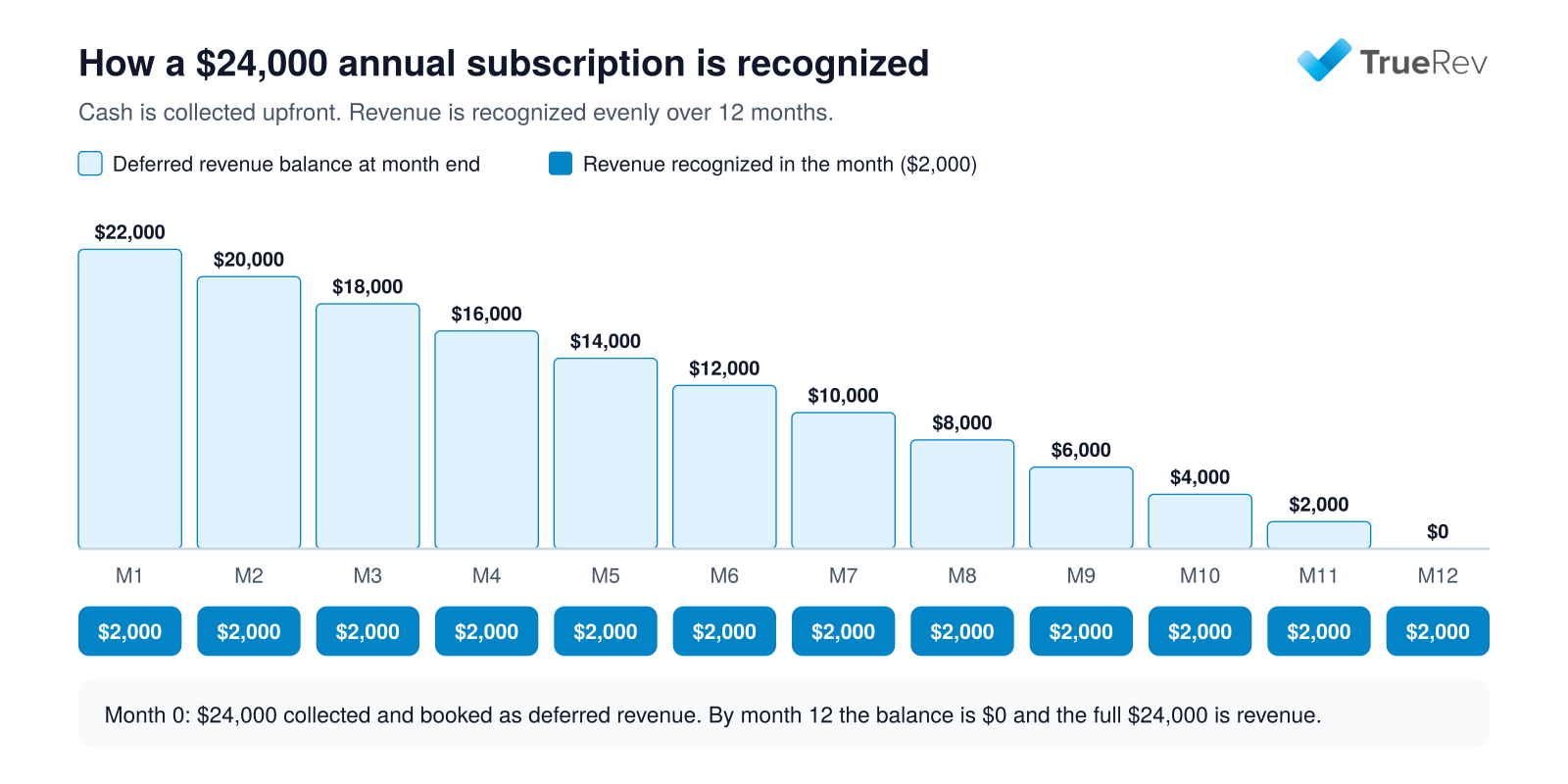
A $24,000 annual subscription: revenue is recognized evenly while the deferred balance unwinds.
Upgrades, renewals, multi-year deals, and credits make this hard to track by hand.
For the accounting basics, see whether deferred revenue is a liability or an asset and the difference between revenue and deferred revenue.
How deferred revenue is recorded
Deferred revenue moves through the books in two steps.
First, the invoice or payment is booked to a liability account.
Then a journal entry moves a slice of it into revenue each month.
| When | Debit | Credit | Amount |
|---|---|---|---|
| Customer is invoiced or pays $24,000 | Accounts receivable or cash | Deferred revenue | $24,000 |
| End of each month | Deferred revenue | Revenue | $2,000 |
Deferred revenue software creates and tracks that monthly entry for every contract, and adjusts it when a contract changes.
Can revenue schedules be automated from invoice dates?
Yes, but an invoice date is usually only one part of the schedule.
A reliable schedule may also depend on the service start and end dates, contract term, recognition method, billing frequency, and any amendments.
QuickBooks Online Advanced applies recognition templates to products and services on invoices, and uses the service date on the invoice to start the schedule.
TrueRev's documentation describes a related distinction.
- The invoice date and sent status affect when an amount enters the deferred revenue balance.
- Revenue start and end dates determine how the schedule is distributed.
- The revenue schedule report shows recognized, deferred, and unbilled totals by contract.
Billing answers when the customer is invoiced, while recognition answers when the company earns the revenue.
Those dates may be the same, but they often are not.
What good deferred revenue management software should report
A schedule is only useful if you can prove the balance at close.
Ask each vendor which of these reports it provides:
- Deferred revenue balance by customer, product, or contract.
- Revenue schedule showing recognized, deferred, and unbilled amounts by month.
- Roll-forward from opening balance, plus billings, minus revenue recognized, to closing balance.
- Waterfall showing when the remaining deferred balance will be recognized.
- Journal entry detail that ties each posted entry back to a contract.
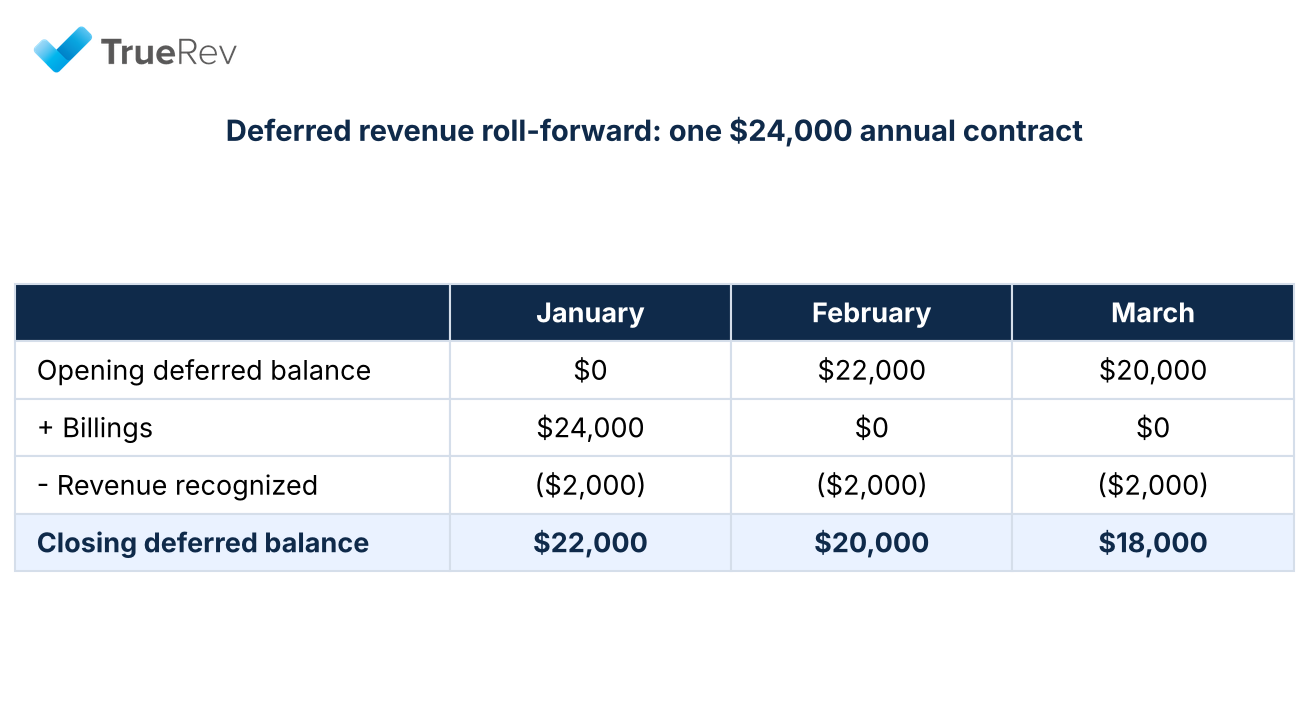
A roll-forward ties the opening and closing deferred balance to billings and revenue recognized.
Reporting depth is the biggest difference between a spreadsheet replacement and a tool your auditors will accept.
The 10 best deferred revenue software tools
1. TrueRev
- Best for: B2B SaaS teams that close their books in QuickBooks Online
- Starting price: $299/month, billed annually
- Works with: QuickBooks Online, HubSpot
- Billing included: Scheduled invoicing from contracts
- Main limitation: Built for QuickBooks Online and contract-based subscriptions, not metered billing
- Consider another option if: you bill by usage, report under IFRS 15, or run a different accounting system
TrueRev is a financial operations platform for B2B SaaS companies.
It builds a revenue schedule for each contract, showing revenue, deferred, and unbilled totals month by month.
Deferred revenue can be viewed by customer, product, or contract, so the balance on your balance sheet ties back to the contracts behind it.
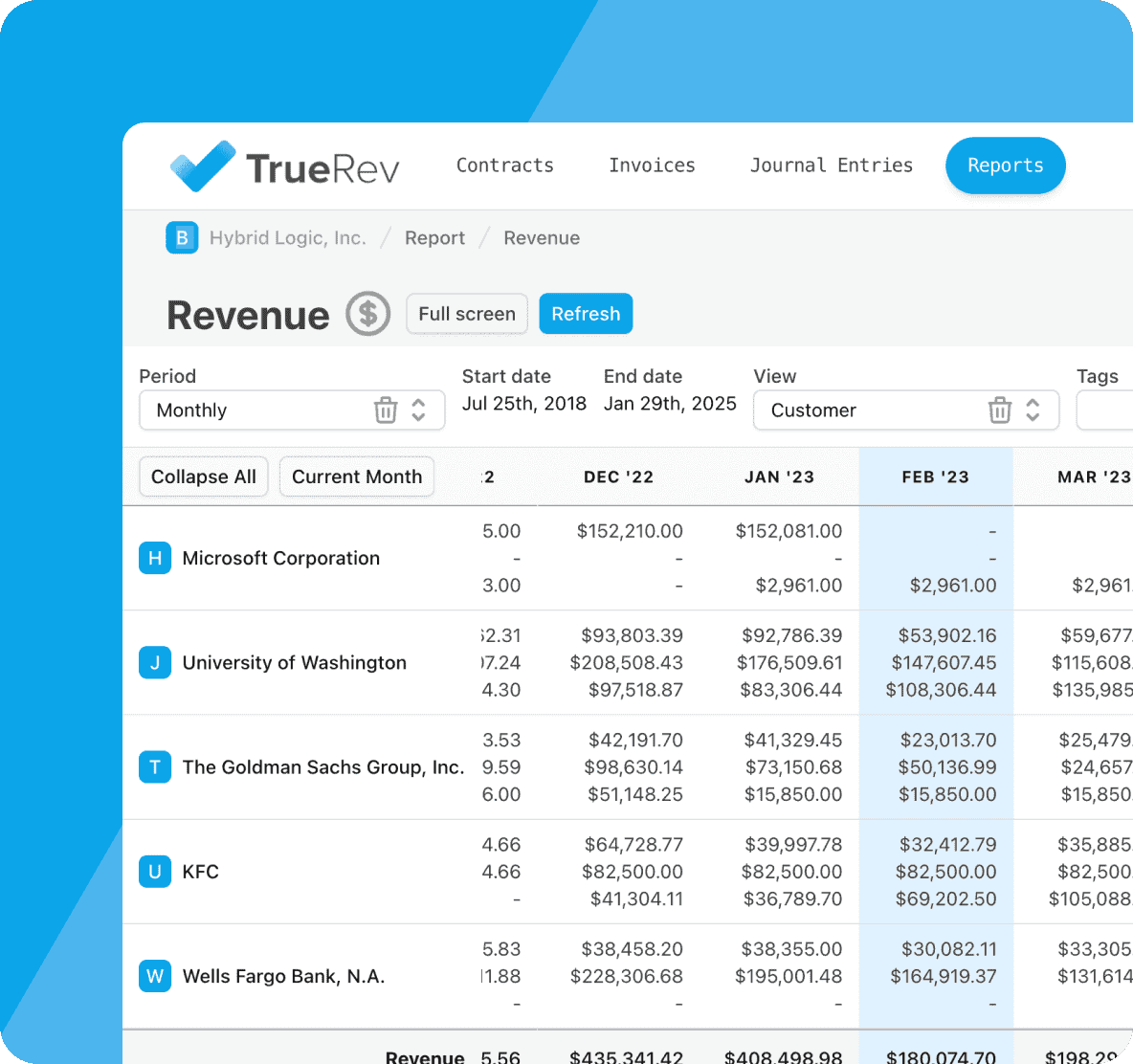
A TrueRev revenue report, with monthly revenue broken out by customer.
The QuickBooks Online integration syncs both ways and keeps QuickBooks as your general ledger.
TrueRev is an official QuickBooks Partner, and connecting a QuickBooks Online company takes minutes.
Loading contracts takes longer and depends on how many you have.
For teams that sell through HubSpot, the HubSpot integration brings in closed deals for finance to confirm before a contract is created.
TrueRev's customer stories include:
- Catapult K12 moving reporting from days to minutes after connecting TrueRev with QuickBooks.
- Inten.to closing its books in two days rather than ten.
- Glean.ai using TrueRev for revenue recognition, deferred revenue journal entries, and SaaS metrics.
- LineVision selecting TrueRev after evaluating other revenue recognition products.
- Perch managing subscription, hardware, and services revenue on different schedules.
ARR, MRR, churn, and retention come from the same contract data, so there is no separate metrics spreadsheet.
TruMan AI lets you ask plain-language questions about supported data in your account.
See deferred revenue software and TrueRev pricing for details.
2. QuickBooks Online Advanced
- Best for: Simple recognition schedules that stay inside QuickBooks
- Starting price: $340/month list price, with promotional discounts
- Works with: QuickBooks Online
- Billing included: Standard QuickBooks invoicing
- Main limitation: Schedules follow invoices and sales receipts, with no contract or SaaS metrics layer
- Consider another option if: contracts change mid-term or you need ARR and MRR from the same data
QuickBooks Online Advanced includes revenue recognition schedules for products and services.
The invoice or sales receipt service date starts the schedule, and Intuit's documentation says you can change a schedule later.
QuickBooks Online Advanced supports straight-line recognition by period and straight-line prorated by days.
Intuit documents milestone, percentage, and one-time future-event methods for Intuit Enterprise Suite rather than QuickBooks Online Advanced.
It suits companies with consistent contract patterns that want everything in one system.
Renewals, mid-term upgrades, and SaaS metrics are handled outside it.
See where QuickBooks falls short for SaaS revenue recognition.
3. Flowrev
- Best for: Teams that want focused revenue schedules, not a full platform
- Starting price: $50/month
- Works with: QuickBooks Online, Xero
- Billing included: No
- Main limitation: Recognition only, and price rises with schedule volume
- Consider another option if: you also need contract records, billing, or SaaS metrics
Flowrev prices by the number of schedules per year.
Bronze is $50 per month for up to 300 schedules and updates existing schedules only.
Silver is $100 for up to 1,200 and adds automatic schedule generation.
Gold is $150 for up to 3,600 and adds automatic journals.
Platinum starts at $300 for 7,200 or more.
Flowrev lists deferred revenue, unbilled receivables, cost recognition, revenue and cost waterfalls, and ARR, MRR, and churn reporting among its features.
It also lists multi-currency and multi-entity reporting.
A 14-day free trial is available.
See the TrueRev vs Flowrev comparison.
4. ScaleXP
- Best for: Small teams that want deferred revenue and reporting at a published price
- Starting price: Growth plan from $350/month in USD; Starter is $125/month
- Works with: QuickBooks, Xero, Zoho Books
- Billing included: Invoicing and billing tools
- Main limitation: Deferred revenue is not listed on the Starter plan, and each subsidiary costs extra
- Consider another option if: you manage many entities or need a contract-to-journal-entry workflow
ScaleXP publishes three plans: Starter at $125, Growth at $350, and Scale from $600 per month.
Deferred revenue is listed on Growth, which also charges $80 per month for each additional subsidiary.
QuickBooks is included on every plan, and Scale adds invoice sync.
It suits smaller teams that want one tool for deferred revenue, invoicing, and reporting.
5. Maxio
- Best for: B2B SaaS companies that want billing and revenue recognition in one platform
- Starting price: Grow plan from $599/month, for up to $100,000 in monthly billings
- Works with: Accounting integrations, including QuickBooks
- Billing included: Yes
- Main limitation: Grow is capped by billing volume, and Scale is quote-only
- Consider another option if: you are happy with your billing system and only need deferred revenue
Maxio combines subscription billing and collections with revenue recognition and deferred revenue reporting.
Confirm which plan includes the revenue recognition features you need, because Maxio does not make that clear on its pricing page.
It suits teams that want to replace their billing system at the same time.
See the TrueRev vs Maxio comparison.
6. Chargebee RevRec
- Best for: Finance teams with hybrid or usage-based pricing across several systems
- Starting price: Custom quote
- Works with: QuickBooks, NetSuite, Sage Intacct, Xero, Stripe, Chargebee
- Billing included: No, it reads billing sources
- Main limitation: Quote-based pricing, and it does not pull draft invoices from QuickBooks
- Consider another option if: you have one billing source and simple contracts
Chargebee RevRec is a revenue subledger that supports ASC 606 and IFRS 15.
Chargebee's QuickBooks documentation says it pulls invoices and credit memos from QuickBooks Online, then posts journal entries back at period close.
Draft and awaiting-approval invoices are not pulled in.
It suits teams with complex pricing and more than one source system.
See the TrueRev vs Chargebee comparison.
7. Ordway
- Best for: SaaS companies with usage-based or hybrid pricing that want billing and recognition together
- Starting price: Custom quote
- Works with: QuickBooks Online, NetSuite, Sage Intacct, Xero
- Billing included: Yes
- Main limitation: Quote-based, and a wider platform than deferred revenue alone
- Consider another option if: you bill by fixed contracts and only need schedules and journals
Ordway is a billing and revenue platform that tracks deferred and recognized revenue schedules under ASC 606 and IFRS 15.
Its support documentation says the QuickBooks Online connector maps customers and products, sends transactions, and pushes revenue journal entries.
QuickBooks stays your general ledger.
Ordway does not publish list pricing.
8. ChargeOver
- Best for: Recurring billing teams that want deferred revenue reports alongside invoicing
- Starting price: Not verified
- Works with: QuickBooks Online
- Billing included: Yes
- Main limitation: Billing-led, so recognition features are lighter than dedicated tools (Unverified)
- Consider another option if: you need multi-element allocation or detailed contract modifications
ChargeOver is a recurring billing platform.
Its QuickBooks documentation says it calculates deferred and recognized revenue totals automatically.
It also explains how to record the monthly move from deferred to recognized revenue in QuickBooks.
It suits teams that want billing first and deferred revenue reporting as part of it.
9. Sage Intacct
- Best for: Growing SaaS companies ready to replace QuickBooks with a full financial system
- Starting price: Request pricing
- Works with: Sage Intacct as the ledger, Salesforce, and other apps
- Billing included: Offered through separate modules, so confirm scope
- Main limitation: It replaces your accounting system rather than adding to QuickBooks
- Consider another option if: you want to keep QuickBooks as your ledger
Sage Intacct is a cloud financial management system with a revenue management module.
Sage says it automates revenue recognition for ASC 606 and IFRS 15 and recalculates deferred and recognized revenue when contracts change.
It also reports deferred versus recognized revenue across unbilled, billed, and paid amounts.
Moving to it means a migration off QuickBooks and an implementation project.
10. RightRev
- Best for: Finance teams with complex contracts and high volumes
- Starting price: Custom quote
- Works with: Salesforce, and an ERP-agnostic subledger design
- Billing included: No
- Main limitation: QuickBooks is not listed on its site, and it targets larger teams
- Consider another option if: you run QuickBooks Online or a small contract volume
RightRev is an AI-powered revenue recognition platform for ASC 606 and IFRS 15.
It handles standalone selling prices, contract modifications, and forecasting, and posts journal entries to the ledger.
It suits companies with multi-element contracts and Salesforce-based sales.
RightRev does not publish pricing.
Best deferred revenue software for QuickBooks users
Many early and growth-stage SaaS companies run QuickBooks Online as their general ledger.
Does QuickBooks handle deferred revenue?
QuickBooks Online Advanced can create revenue recognition schedules for products and services.
Lower plans do not include that feature, so many teams track deferred revenue in spreadsheets.
When is QuickBooks Online Advanced enough?
- Contracts follow consistent patterns.
- Schedules map directly to invoices.
- You do not need contract records or SaaS metrics from the same data.
When should a QuickBooks team add dedicated software?
- Schedules live in spreadsheets. Someone maintains the formulas and contract changes every month.
- Contracts change mid-term. Upgrades, renewals, and credits change existing schedules.
- You need ARR, MRR, and churn from the same data. Keeping metrics apart from accounting data creates reconciliation work.
- Audit and board reporting need support. You want a trail from contract to journal entry.
How each tool connects to QuickBooks
| Software | What it does with QuickBooks |
|---|---|
| TrueRev | Two-way sync. Maps revenue and deferred revenue accounts, brings in existing invoices, creates scheduled invoices, and posts revenue entries after finance review. |
| QuickBooks Online Advanced | Built in. Schedules start from invoices and sales receipts. |
| Flowrev | Certified for QuickBooks Online. Automatic journals start on the Gold plan. |
| ScaleXP | QuickBooks is included on every plan, and the Scale plan adds invoice sync. |
| Chargebee RevRec | Pulls invoices and credit memos from QuickBooks, then posts journal entries at period close. Draft invoices are not pulled. |
| Ordway | Maps customers and products, sends transactions, and pushes revenue journal entries, with summary or detailed options. |
| ChargeOver | Calculates deferred and recognized totals, with documentation on recording the monthly move in QuickBooks. |
| Maxio | Lists QuickBooks among its accounting integrations. Confirm direction and objects with Maxio. |
What to ask about a QuickBooks integration
"Integrates with QuickBooks" can mean very different things, so ask each vendor:
- Which objects sync, such as customers, invoices, and journal entries?
- In which direction does each one sync, and how often?
- How are journal entries created and reviewed before they post?
- What happens when a record changes after it has synced?
Among the tools here, TrueRev, Flowrev, ScaleXP, Maxio, Chargebee RevRec, Ordway, and ChargeOver list QuickBooks connections.
For more, see automating ASC 606 on QuickBooks and the best revenue recognition software for QuickBooks.
How to choose deferred revenue software
| If your situation is... | Look at |
|---|---|
| You close in QuickBooks Online with fixed-term subscriptions | TrueRev, QuickBooks Online Advanced, Flowrev |
| You want deferred revenue and invoicing at a published price | ScaleXP, ChargeOver |
| You want billing and recognition in one platform | Maxio, Ordway |
| You have usage-based or hybrid pricing | Ordway, Chargebee RevRec, Maxio |
| You are replacing QuickBooks | Sage Intacct |
| You have complex bundles and Salesforce | RightRev, Chargebee RevRec |
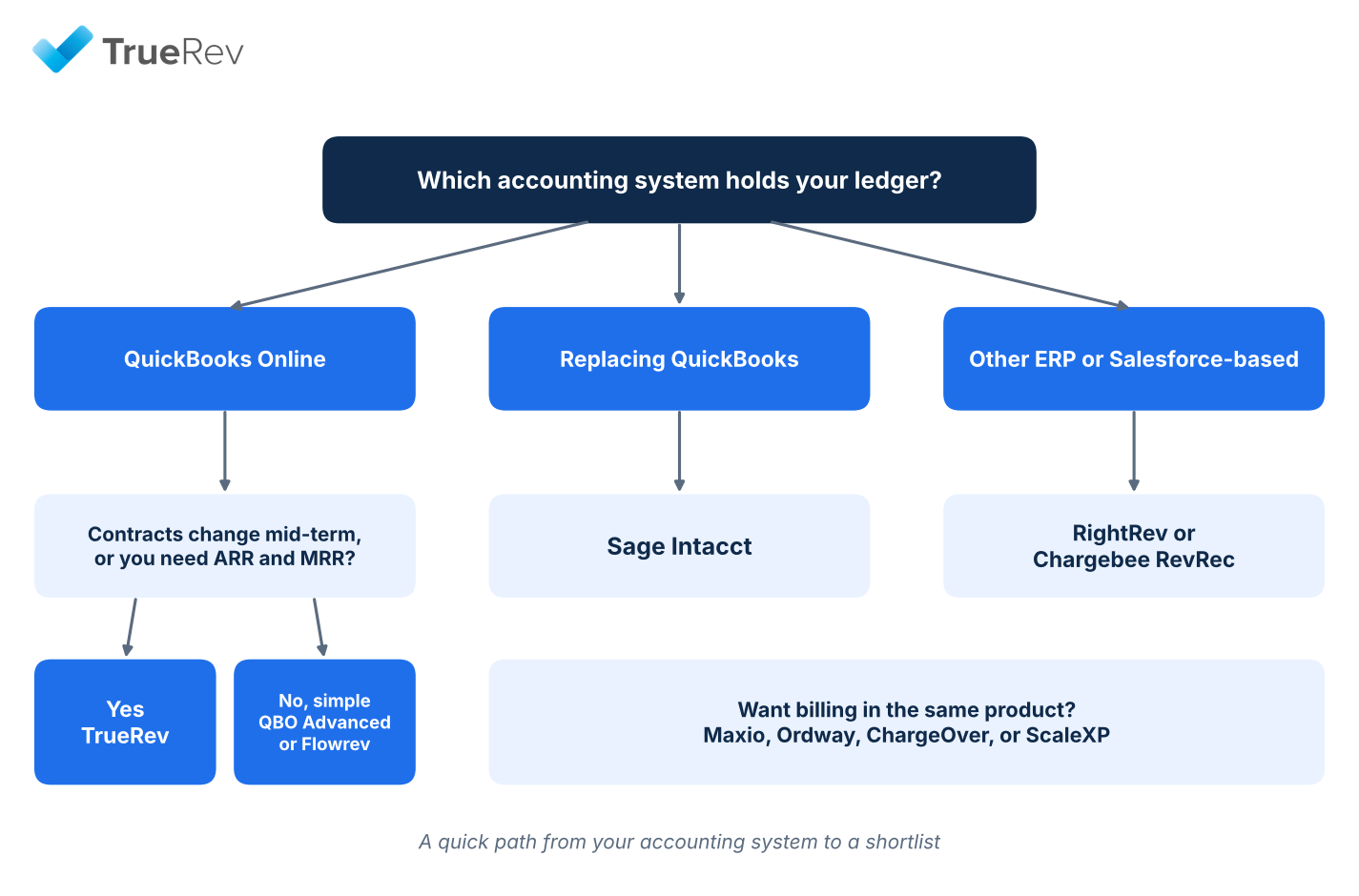
A quick path from your accounting system to a shortlist.
Before shortlisting, work through these questions.
- Which system holds the general ledger? Confirm the vendor supports it by name.
- Are you replacing billing too? If not, favor tools that read your current billing source.
- How often do contracts change? Mid-term upgrades and credits are where simple tools strain.
- Do you need metrics from the same data? See how a SaaS metrics dashboard works with QuickBooks.
- Who reviews journal entries? Look for a review step before anything posts.
Then test each shortlisted tool with real contract changes: a mid-term upgrade, a downgrade, a renewal, a cancellation, a partial credit, and a backdated amendment.
Ask the vendor to show what happens to the schedule, the deferred balance, the unbilled balance, and the journal entries.
Common deferred revenue use cases for B2B SaaS
- Annual prepaid subscription: the customer is invoiced for the full year, and revenue is recognized across the service period.
- Quarterly billing on an annual contract: billing happens every three months, but the schedule covers the full year.
- Multi-year agreement: price increases, renewals, and different service periods all affect the schedule.
- Upgrade or downgrade: the future schedule must be revised mid-term.
- Subscription plus implementation services: each part may follow its own recognition policy.
- Delayed billing: service starts before the invoice, which creates unbilled revenue rather than deferred revenue.
- Mixed revenue streams: subscription, services, hardware, and usage may each follow a different schedule.
How much does deferred revenue software cost?
Published pricing:
- Flowrev: from $50/month.
- ScaleXP: Starter $125, Growth $350, Scale from $600 per month.
- TrueRev: $299/month, billed annually.
- QuickBooks Online Advanced: $340/month list price.
- Maxio: Grow plan from $599/month.
Custom quote or not published: Chargebee RevRec, Ordway, ChargeOver, Sage Intacct, and RightRev.
Implementation and add-ons are usually priced separately.
Frequently asked questions
What is deferred revenue software?
Deferred revenue software tracks payments received before a service is delivered and releases them into revenue over the service period.
It produces the deferred revenue balance and journal entries, and updates them when contracts change.
What is the best deferred revenue software?
The best option depends on your accounting system and contract complexity.
For B2B SaaS teams on QuickBooks Online, TrueRev, QuickBooks Online Advanced, and Flowrev are the closest fits.
Teams that want billing in the same product usually look at Maxio or Ordway.
What is the best deferred revenue software for QuickBooks?
TrueRev, Flowrev, ScaleXP, Maxio, Chargebee RevRec, Ordway, and ChargeOver all list QuickBooks connections, and QuickBooks Online Advanced has schedules built in.
Ask each vendor what syncs, in which direction, and how journal entries are reviewed.
Does QuickBooks Online have deferred revenue automation?
QuickBooks Online Advanced includes revenue recognition schedules for products and services.
Other QuickBooks plans do not include it.
Can I automate revenue schedules from invoice dates?
Yes.
QuickBooks Online Advanced starts a schedule from the service date on an invoice or sales receipt.
Contract-based tools such as TrueRev build the schedule from contract start and end dates and bring in existing QuickBooks invoices.
How do I calculate deferred revenue?
Divide the amount paid by the number of months in the service period to get the monthly revenue.
The deferred balance is the amount billed minus the revenue recognized so far.
A $24,000 annual contract recognizes $2,000 a month and has $22,000 deferred after month one.
Does deferred revenue software replace QuickBooks?
Usually not.
A dedicated tool often acts as a revenue layer connected to QuickBooks, which stays your general ledger.
How should software handle contract amendments?
It should record the amendment, apply your configured accounting treatment, update the schedule, keep the history, and show the resulting journal changes.
What happens to my existing deferred balance during implementation?
You normally load active contracts and opening balances, generate the remaining schedules, and reconcile the new system to QuickBooks.
Test the process on a closed period before go-live.
What is deferred revenue accounting software?
Deferred revenue accounting software automates the schedules and journal entries that move prepaid amounts from a liability account into revenue.
It is the same category as deferred revenue management software, with the focus on accounting entries and balance sheet accuracy.
What is the journal entry for deferred revenue?
When a customer prepays, debit cash or accounts receivable and credit deferred revenue.
Each month, debit deferred revenue and credit revenue for the amount earned.
What is a deferred revenue waterfall or roll-forward?
A roll-forward starts with the opening deferred balance, adds billings, subtracts revenue recognized, and ends with the closing balance.
A waterfall shows when the remaining balance will be recognized in future months.
Ask each vendor which of these reports it provides.
Is deferred revenue an asset or a liability?
Deferred revenue is a liability, because you owe the customer service you have been paid for.
See deferred revenue as a liability or asset.
What is the difference between deferred revenue and unbilled revenue?
Deferred revenue is cash received before the work is earned.
Unbilled revenue is work earned before an invoice is sent.
See unbilled revenue vs deferred revenue.
Is there free deferred revenue software?
Free options are rare.
Flowrev lists a free tier for bootstrapped businesses with under $50,000 in sales, and free trials are more common, such as TrueRev's 14 days and Flowrev's 14 days.
How much does deferred revenue software cost?
Published prices in this guide run from $50 to $599 per month.
Other tools quote pricing by volume, modules, and implementation.
Which tools include billing?
Maxio, Ordway, and ChargeOver include billing, and TrueRev includes scheduled invoicing from contracts.
Flowrev, Chargebee RevRec, and RightRev read billing data from other sources.
Which tools support usage-based or hybrid pricing?
Ordway, Chargebee RevRec, and Maxio list usage-based or hybrid support.
TrueRev is built for contract-based subscriptions with scheduled invoicing and does not offer metered billing.
Which tools work with HubSpot?
TrueRev lists a HubSpot integration.
ScaleXP and Ordway list CRM connections, so confirm HubSpot support with them directly.
TrueRev imports closed HubSpot deals and waits for finance to confirm them before a contract is created.
Which tools work with Xero?
Flowrev, ScaleXP, Chargebee RevRec, and Ordway list Xero.
TrueRev and QuickBooks Online Advanced are built for QuickBooks Online.
When should I move from spreadsheets to deferred revenue software?
There is no universal threshold.
Common triggers are frequent mid-term changes, a close that depends on one person's workbook, audit or investor scrutiny, and the need for ARR and MRR from the same data.
How do I move deferred revenue out of spreadsheets?
- Pick a cutoff date at the end of a closed period.
- Export contracts with dates, amounts, and billing schedules.
- Map revenue and deferred revenue accounts.
- Load contracts and compare the balance to your balance sheet.
- Run one close in parallel before retiring the spreadsheet.
See moving beyond Excel for SaaS revenue recognition.
Is deferred revenue software audit-ready?
It supports an audit but does not guarantee compliance, because your team still owns the accounting policy.
Look for a trail from contract to journal entry and a review step before entries post.
Can AI automate deferred revenue?
AI can speed up setup and reporting, but accounting decisions stay with finance.
TrueRev's TruMan AI answers plain-language questions about supported account data.
Is QuickBooks enough for SaaS deferred revenue?
QuickBooks Online Advanced is enough for simple, invoice-driven schedules.
Teams usually outgrow it when contracts change mid-term or they need ARR and MRR from the same data.
What should I ask vendors during a demo?
- Which journal entries post to the ledger, and in which direction does data sync?
- How are upgrades, credits, and cancellations handled?
- Is there an audit trail and a review step before posting?
- How do I load existing contracts and reconcile to my deferred balance?
- What is the first-year cost, including implementation?
Which deferred revenue software should you choose?
If you run QuickBooks Online, start with TrueRev, QuickBooks Online Advanced, and Flowrev.
If you want billing and recognition together, look at Maxio or Ordway.
If you are replacing QuickBooks, look at Sage Intacct.
If you are a B2B SaaS company on QuickBooks Online still building schedules in spreadsheets, schedule a TrueRev demo to see contracts, revenue schedules, and journal entries together.
Want to see a demo?
we offer a 14-day free trial.