


On this page
Revenue recognition software turns SaaS contracts into revenue schedules, deferred revenue balances, and journal entries, so finance teams stop rebuilding them in spreadsheets every month.
Here are 10 of the best options for SaaS companies, from QuickBooks Online Advanced to enterprise platforms such as Zuora Revenue.
Revenue recognition software for SaaS at a glance
The right tool depends on your accounting system, whether you need billing in the same product, and how complex your contracts are.
| Software | Best for | Works with | Starting price | Billing included? |
|---|---|---|---|---|
| TrueRev | B2B SaaS teams on QuickBooks Online | QuickBooks Online, HubSpot | $299/month, billed annually | Scheduled invoicing from contracts |
| QuickBooks Online Advanced | Simple schedules inside QuickBooks | QuickBooks Online | $340/month list price | QuickBooks invoicing |
| Flowrev | Focused revenue schedules | QuickBooks Online, Xero | $50 to $300+ per org/month | No |
| Maxio | Billing and revenue recognition together | Accounting integrations (confirm with Maxio) | Grow plan at $599/month; Scale is custom | Yes, including usage-based billing |
| Chargebee RevRec | Hybrid and usage-based pricing across systems | QuickBooks, NetSuite, Sage Intacct, Xero, Stripe, Chargebee | Custom quote; from about $5,000/year | No, connects to billing sources |
| Zenskar | Custom contracts and no-code rules | NetSuite, QuickBooks, HubSpot | Custom quote; from about $15,000/year | Order-to-cash platform |
| Tabs | AI-assisted contract-to-cash | QuickBooks, HubSpot, DocuSign | Custom quote; plans from about $1,500/month | Yes |
| Stripe Revenue Recognition | Companies that bill through Stripe | Stripe data, exports to accounting systems | From $25/month plus volume fees | No, reads transaction data |
| NetSuite Advanced Revenue Management | Companies already on NetSuite | NetSuite | Quote-based add-on to a NetSuite license | Within the NetSuite suite |
| Zuora Revenue | Complex bundles and high contract volume | Accounting and billing systems | Custom quote; from about $20,000/year | Zuora Billing is a separate product |
Pricing and plan information reflects each vendor's public pages at the time of writing.
What we looked at
Each tool is listed with the same details:
- Best for: the type of team it suits.
- Starting price: the published or approximate entry price.
- Works with: accounting systems, CRMs, and billing tools it connects to.
- Billing included: whether invoicing comes with it.
- Main limitation: where it may not fit.
What revenue recognition software does for a SaaS company
Revenue recognition software applies the rules of ASC 606 (US GAAP) or IFRS 15 to customer contracts and spreads revenue across the period in which it is earned.
It produces the revenue schedule, the deferred revenue balance, and the journal entries the finance team posts to the general ledger.
Here is a simple illustration.
A customer pays $24,000 upfront for a 12-month subscription.
The company books the full $24,000 as deferred revenue, then recognizes $2,000 each month.
After the first month, $22,000 remains deferred.
Mid-term upgrades, multi-year deals, renewals, and credits make this harder to track by hand.
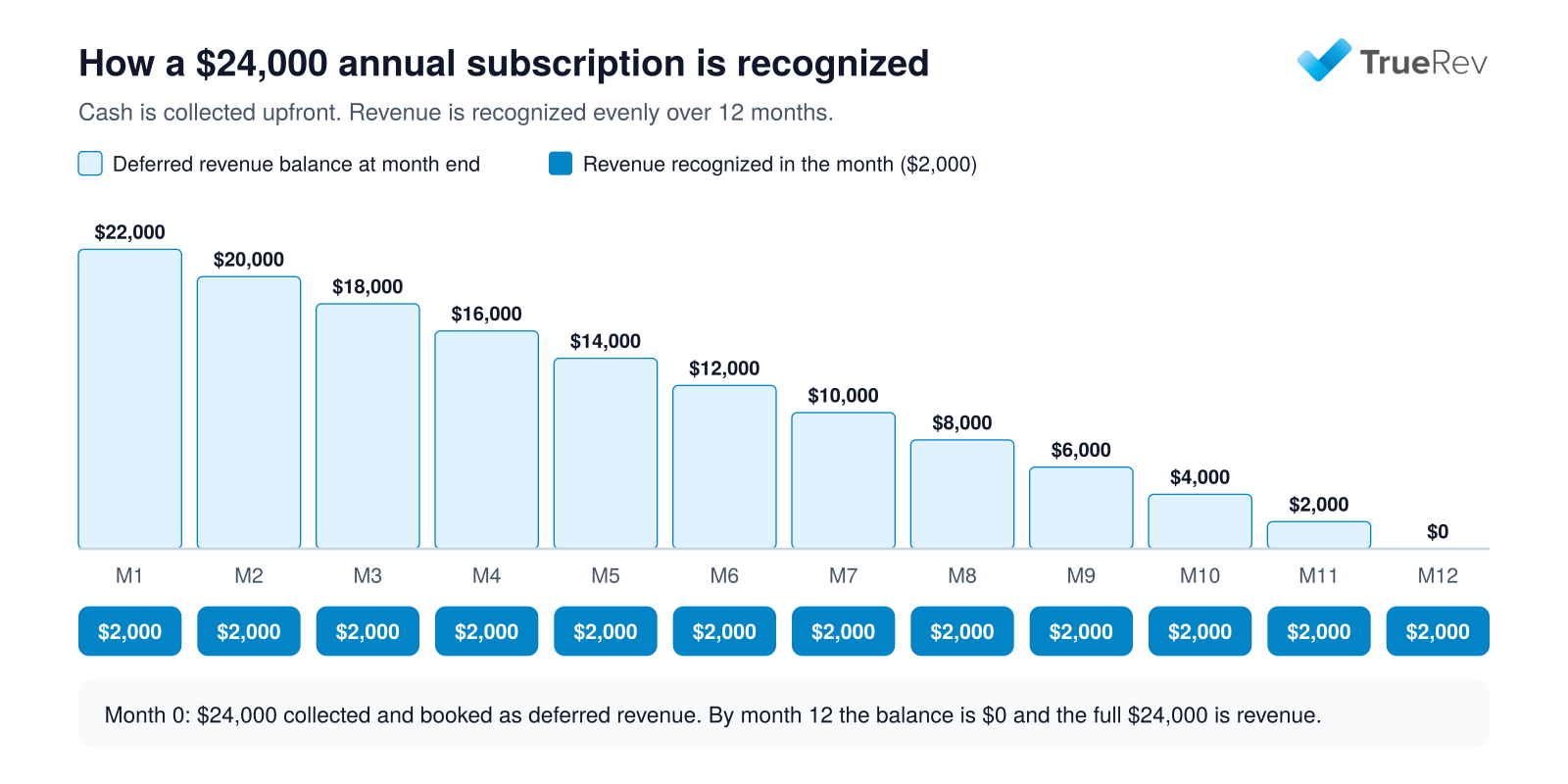
A $24,000 annual subscription: revenue is recognized evenly while the deferred balance unwinds.
For the accounting basics behind this, see how the subscription model affects revenue recognition and what deferred revenue is and why it sits on the balance sheet as a liability.
The 10 best revenue recognition tools for SaaS companies
1. TrueRev
- Best for: B2B SaaS teams that close their books in QuickBooks Online
- Starting price: $299/month, billed annually
- Works with: QuickBooks Online, HubSpot
- Billing included: Scheduled invoicing from contracts
- Main limitation: Designed for QuickBooks Online accounting, with scheduled invoicing rather than metered billing
TrueRev is a financial operations platform for B2B SaaS companies.
It builds revenue schedules, deferred revenue balances, and journal entries from customer contracts, and handles renewals, upgrades, and cancellations on the same contract record.
ARR, MRR, churn, and retention metrics come from that same contract data, so the finance team does not maintain a separate metrics spreadsheet.
The QuickBooks Online integration keeps QuickBooks as the general ledger.
TrueRev maps your revenue and deferred revenue accounts, brings in existing invoices, creates scheduled invoices in QuickBooks, and posts revenue recognition entries after finance reviews them.
TrueRev is an official QuickBooks Partner, and connecting a QuickBooks Online company takes minutes.
Loading contracts takes longer and depends on how many you have.
For teams that sell through HubSpot, the HubSpot integration imports closed deals, suggests the matching QuickBooks customer and products, and waits for finance to confirm before a contract is created.
TruMan AI lets users ask questions in plain language about supported data in their TrueRev account, such as MRR over a period or which contracts are approaching renewal.
TrueRev is built for early and growth-stage B2B SaaS teams that run on QuickBooks Online.
QuickBooks stays your general ledger, so there is no ERP migration.
Contracts, revenue schedules, deferred revenue, scheduled invoices, and SaaS metrics sit in one place.
See TrueRev pricing for current plan details.
2. QuickBooks Online Advanced
- Best for: Simple recognition schedules that stay inside QuickBooks
- Starting price: $340/month list price, with promotional discounts
- Works with: QuickBooks Online
- Billing included: Standard QuickBooks invoicing
- Main limitation: Schedules are driven by invoices and sales receipts, with no contract or SaaS metrics layer
QuickBooks Online Advanced includes automated revenue recognition, so deferred revenue can be tracked and entered without a separate spreadsheet.
Intuit's help documentation says users can edit an existing schedule to change the service duration, update scheduled payments, or change an item's price.
It suits companies with consistent contract patterns that want one system.
Schedules follow the invoice or sales receipt, so contract events, renewals, and SaaS metrics are managed elsewhere.
TrueRev has a separate guide to where QuickBooks falls short for SaaS revenue recognition.
3. Flowrev
- Best for: Teams that need focused revenue recognition schedules, not a full platform
- Starting price: $50 per organization per month
- Works with: QuickBooks Online, Xero
- Billing included: No
- Main limitation: Recognition only, and price rises with schedule volume
Flowrev prices by the number of schedules per year.
Bronze is $50 per month for up to 300 schedules, Silver is $100 for up to 1,200, Gold is $150 for up to 3,600, and Platinum starts at $300 for 7,200 or more.
All plans include every recognition method, automatic journals, change handling, revenue and bookings forecasts, multi-currency, and multi-entity consolidated reports.
Flowrev offers a 14-day free trial.
It suits small teams that want schedules and journals connected to QuickBooks Online or Xero without billing or contract management.
Multi-user and multi-organization access is marked as an add-on.
See the TrueRev vs Flowrev comparison for a closer look.
4. Maxio
- Best for: B2B SaaS companies that want billing and revenue recognition in one platform
- Starting price: Grow plan at $599/month, for up to $100,000 in monthly billings
- Works with: Accounting integrations (confirm the specific system with Maxio)
- Billing included: Yes, including usage-based billing
- Main limitation: Grow plan is capped by billing volume, and advanced modules are priced separately
Maxio combines subscription management, recurring billing, collections, and usage-based billing with revenue recognition.
Its revenue recognition features include scheduled, recognized, and deferred revenue, performance obligations, standalone selling prices, and multiple revenue books.
The Scale plan, for companies above $100,000 in monthly billings, is quoted.
Agreements default to annual payment, and users are unlimited.
Optional modules such as advanced revenue management, A/R management, multi-entity, and event-based billing carry their own costs, which Maxio does not list publicly.
It suits teams that want to replace their billing system at the same time.
See the TrueRev vs Maxio comparison.
5. Chargebee RevRec
- Best for: Companies with hybrid, usage-based, or credit-based pricing across several systems
- Starting price: Custom quote, with plans from about $5,000 per year
- Works with: QuickBooks, NetSuite, Sage Intacct, Xero, Stripe, Chargebee
- Billing included: No, it connects to billing sources
- Main limitation: Quote-based pricing, and billing data syncs on a 24-hour cycle
Chargebee RevRec is positioned as a single revenue subledger that supports ASC 606 and IFRS 15.
It recognizes recurring, variable, credit-based, and hybrid models, including multi-year ramp contracts, and uses a configurable standalone selling price library to allocate transaction prices across performance obligations.
The subledger includes A/R aging and roll-forward reports, period locking, and an audit trail from contract to journal entry.
Chargebee lists native connections to Chargebee, Stripe, NetSuite, Sage Intacct, QuickBooks, and Xero.
It suits finance teams with complex pricing and more than one source system.
See the TrueRev vs Chargebee comparison.
6. Zenskar
- Best for: Teams with custom contracts that want no-code recognition rules
- Starting price: Custom quote, with plans from about $15,000 per year (Starter, Standard, and Enterprise tiers)
- Works with: NetSuite, QuickBooks, HubSpot, and other systems
- Billing included: Order-to-cash platform
- Main limitation: Quote-based pricing, and broader than a team that only needs schedules
Zenskar supports ASC 606 and IFRS 15 with multiple recognition methods, AI-generated performance obligations, and no-code custom rules.
It also lists audit trails and locked-period protection.
Its pricing page says it does not charge a percentage of revenue, and that all features are included on every plan, with support and implementation differing by plan.
It suits companies whose contracts do not follow a standard pattern.
See the TrueRev vs Zenskar comparison.
7. Tabs
- Best for: Finance teams that want billing, collections, and revenue recognition in one AI-assisted platform
- Starting price: Custom quote, with plans from about $1,500 per month
- Works with: QuickBooks, HubSpot, DocuSign
- Billing included: Yes
- Main limitation: Quote-based pricing, and a wider platform than recognition alone
Tabs describes itself as an AI-powered revenue platform covering billing, collections, revenue recognition, reporting, and payments.
It supports subscription, usage-based, and hybrid models and generates revenue schedules from contracts and usage, with automated ASC 606 recognition.
It suits teams that want to consolidate several finance workflows in one platform.
See the TrueRev vs Tabs comparison.
8. Stripe Revenue Recognition
- Best for: Companies that bill and collect through Stripe
- Starting price: $25/month for up to $10,000 in monthly volume, then volume-based plans
- Works with: Stripe data, with exports to accounting systems
- Billing included: No, it reads transaction data
- Main limitation: Cost grows with transaction volume
Stripe Revenue Recognition converts Stripe transactions and billing terms into journal entries mapped to general ledger accounts.
Stripe says it handles more than 15 pricing models, including usage-based and hybrid billing, and supports custom rules tied to performance obligations.
Other transactions can be added through CSV import or app store connectors.
Stripe's pricing page lists a $25 monthly plan for up to $10,000 in monthly volume with a 0.25% fee on additional volume.
Annual plans billed monthly start at $190 per month for up to $100,000 in monthly volume, with a 0.2% fee on additional volume.
A 30-day free trial is available for new users.
It suits companies where most revenue already flows through Stripe.
The fee is tied to transaction volume.
9. NetSuite Advanced Revenue Management
- Best for: SaaS companies that already run NetSuite
- Starting price: Quote-based, licensed as an add-on to a NetSuite subscription
- Works with: NetSuite
- Billing included: Within the NetSuite suite
- Main limitation: Requires NetSuite and implementation expertise
NetSuite Advanced Revenue Management is a module inside the NetSuite ERP that automates rules-based revenue recognition for ASC 606 and IFRS 15.
Oracle's documentation covers Advanced Revenue Management (Essentials) and the Revenue Allocation add-on, and says moving from classic revenue recognition to Advanced Revenue Management requires NetSuite Professional Services or a qualified partner.
It requires NetSuite as the accounting system.
10. Zuora Revenue
- Best for: High contract volumes and complex bundles
- Starting price: Custom quote, with contracts from about $20,000 per year
- Works with: Accounting and billing systems
- Billing included: Zuora Billing is a separate product
- Main limitation: Quote-based pricing, and more than a team with simple contracts needs
Zuora Revenue is described by Zuora as automating revenue recognition for any business model, with a focus on teams managing thousands of contracts and complex bundles.
Zuora quotes pricing based on the products, volumes, and implementation involved.
The product was previously called RevPro.
It suits larger finance teams with complex bundles.
See the TrueRev vs Zuora comparison.
Best revenue recognition software for QuickBooks Online users
Many early and growth-stage SaaS companies run QuickBooks Online as their general ledger.
Does QuickBooks Online support revenue recognition?
Yes, in the Advanced plan.
Intuit's documentation says QuickBooks Online Advanced can create revenue recognition schedules for products and services and adjust them when transaction details change.
When is QuickBooks Online Advanced enough?
QuickBooks Online Advanced is usually enough when:
- Contracts follow consistent recognition patterns.
- Revenue schedules are tied directly to invoices.
- The finance team wants everything inside one system.
- Native QuickBooks reporting meets board and audit needs.
- There is no need for a separate contract or SaaS metrics layer.
When should a QuickBooks team add dedicated software?
Dedicated revenue recognition software becomes more useful when:
- Schedules still live in spreadsheets. Someone maintains the formulas, versions, and contract changes every month.
- Deferred revenue takes repeated manual work. Annual and multi-year prepaid contracts create balances that have to be proven at every close.
- Contracts change mid-term. Upgrades, downgrades, renewals, and cancellations change existing schedules.
A dedicated tool keeps a record of what changed and how it affected recognized and deferred revenue. - ARR, MRR, and churn come from the same data. The controller needs recognized and deferred revenue, while the CFO or founder needs recurring metrics.
Keeping them apart from the accounting data creates reconciliation work. - Audit and board reporting need support. Look for an audit trail from contract to journal entry, plus a review step before entries post.
For example, if a customer upgrades in month five of a twelve-month contract, a spreadsheet means re-cutting the remaining months and recalculating the deferred balance by hand.
What to ask about a QuickBooks integration
"Integrates with QuickBooks" can mean very different things.
Before choosing, ask each vendor:
- Which data objects sync, such as customers, invoices, chart of accounts, and journal entries?
- In which direction does each one sync, and how often?
- How are invoices handled, and how are journal entries created and reviewed?
- What happens when a record changes after it has synced?
Among the tools in this guide, TrueRev, Flowrev, Chargebee RevRec, Zenskar, and Tabs list QuickBooks connections.
For deeper reading on this setup, see where QuickBooks falls short for SaaS revenue recognition, deferred revenue software for QuickBooks, and automating ASC 606 on QuickBooks.
How to choose the right revenue recognition software
Start with the accounting system and billing setup, then check contract complexity and price.
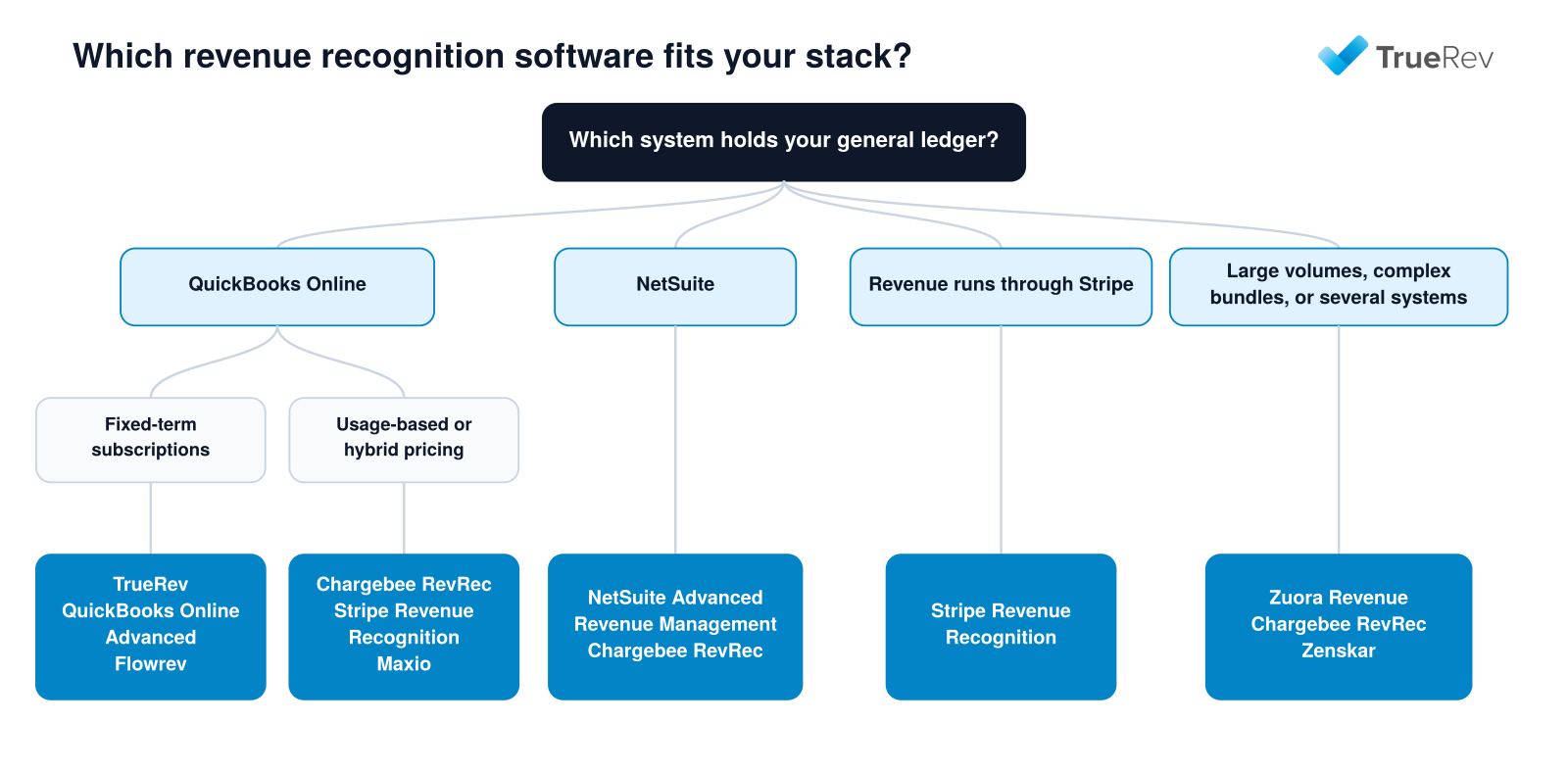
A quick path from your accounting system and pricing model to a shortlist.
| If your situation is... | Look at |
|---|---|
| You close in QuickBooks Online and contracts are mostly fixed-term subscriptions | TrueRev, QuickBooks Online Advanced, Flowrev |
| You want billing and recognition in one platform | Maxio, Tabs, Zenskar |
| You have usage-based, hybrid, or credit-based pricing | Chargebee RevRec, Stripe Revenue Recognition, Maxio |
| Most revenue flows through Stripe | Stripe Revenue Recognition |
| You run NetSuite | NetSuite Advanced Revenue Management, Chargebee RevRec |
| You manage thousands of contracts or complex bundles | Zuora Revenue, Chargebee RevRec, Zenskar |
Before shortlisting, work through these questions:
- Which system holds the general ledger? Confirm the vendor supports it by name, and ask what data moves in each direction.
- Are you replacing billing too? If not, favor tools that connect to your current billing source.
- How many contract changes happen each month? Mid-term upgrades, credits, and renewals are where simpler tools get strained.
- Do you need metrics from the same data? If ARR, MRR, and churn reporting is part of the problem, check whether the tool produces them.
Otherwise see how a SaaS metrics dashboard works with QuickBooks. - Who reviews the journal entries? Look for a review step before anything posts to the ledger, plus an audit trail and period locking.
If billing and contract-to-cash are the larger issue, see TrueRev's guide to contract-to-cash software for B2B SaaS.
How much does revenue recognition software cost?
Published pricing:
- TrueRev: $299/month, billed annually.
- QuickBooks Online Advanced: $340/month list price.
- Flowrev: from $50/month.
- Maxio: Grow plan at $599/month.
- Stripe Revenue Recognition: from $25/month plus volume fees.
Custom quote (approximate starting points):
- Chargebee RevRec: from about $5,000/year.
- Zenskar: from about $15,000/year.
- Tabs: from about $1,500/month.
- Zuora Revenue: from about $20,000/year.
- NetSuite Advanced Revenue Management: quote-based add-on to a NetSuite subscription.
Final pricing depends on volume, modules, and contract length.
Implementation and add-ons are usually priced separately.
How to move revenue recognition out of spreadsheets
Most teams switch at a period close, so the old and new schedules can be compared.
A practical sequence:
- Pick a cutoff date at the end of a closed period.
- Export your contracts with start and end dates, amounts, billing schedules, and any modifications.
- Map your accounts, including revenue and deferred revenue accounts, to the new tool.
- Load contracts and compare the deferred revenue balance to your current balance sheet.
- Run one close in parallel before retiring the spreadsheet.
- Review journal entries before they post to the ledger.
For a longer walkthrough, see moving beyond Excel for SaaS revenue recognition and automating ASC 606 on QuickBooks.
Frequently asked questions
What is revenue recognition software?
Revenue recognition software automates the accounting for subscription revenue under ASC 606 and IFRS 15.
It turns customer contracts into revenue schedules, deferred revenue balances, and journal entries, and updates them when contracts are upgraded, renewed, or cancelled.
Finance teams use it to replace spreadsheet schedules and to support month-end close and audits.
What is the best revenue recognition software for startups and small SaaS companies?
For startups, the best fit depends on the accounting system.
Flowrev (from $50 per month) and TrueRev ($299 per month, billed annually) suit teams on QuickBooks Online, Stripe Revenue Recognition (from $25 per month) suits companies that bill through Stripe, and QuickBooks Online Advanced suits teams that want to stay inside QuickBooks.
Quote-based platforms such as Tabs and Zenskar usually fit larger or more complex businesses.
Is there free revenue recognition software?
Free revenue recognition software is rare, and most platforms are paid.
Flowrev lists a $0 tier for recently started, bootstrapped businesses with sales under $50,000.
Free trials are more common: TrueRev and Flowrev offer 14 days, and Stripe Revenue Recognition offers 30 days for new users.
Which revenue recognition software works with QuickBooks Online?
Revenue recognition software that works with QuickBooks Online includes TrueRev, Flowrev, Chargebee RevRec, Zenskar, and Tabs, plus QuickBooks Online Advanced, which has recognition built in.
Stripe Revenue Recognition exports journal entries to accounting systems.
Ask each vendor which objects sync, such as invoices, customers, and journal entries, and in which direction.
Which revenue recognition software works with Xero?
Flowrev and Chargebee RevRec list Xero as a supported accounting system.
Stripe Revenue Recognition can export journal entries for use in other accounting tools.
TrueRev, QuickBooks Online Advanced, and NetSuite Advanced Revenue Management are built for QuickBooks Online or NetSuite, not Xero.
Which revenue recognition software works with NetSuite?
NetSuite Advanced Revenue Management is the native module inside NetSuite.
Chargebee RevRec and Zenskar also list NetSuite connections, which suits teams that want a recognition layer outside the ERP.
Zuora Revenue is described as working with several ERP and accounting systems, so confirm NetSuite support in writing.
Which revenue recognition software works with Sage Intacct?
Chargebee RevRec lists a native connection to Sage Intacct.
For the other tools in this guide, Sage Intacct support is not listed on the vendors' own sites, so confirm it with the vendor before shortlisting.
Which revenue recognition software works with Stripe?
Stripe Revenue Recognition reads Stripe transactions directly.
Chargebee RevRec also lists Stripe as a native connection.
If invoices and contracts live outside Stripe, check whether the tool can import them by file or connector.
Which revenue recognition software works with HubSpot?
TrueRev, Zenskar, and Tabs list HubSpot integrations.
TrueRev imports closed HubSpot deals and waits for finance to confirm them before a contract is created.
Check how each tool handles amendments and renewals after the first deal is imported.
Which revenue recognition software supports usage-based or hybrid pricing?
Chargebee RevRec, Stripe Revenue Recognition, Maxio, and Tabs support usage-based or hybrid models.
Zenskar also supports custom contract structures through no-code rules.
TrueRev is designed for contract-based subscriptions with scheduled invoicing and does not offer metered billing, so usage-heavy businesses should shortlist the others first.
Which revenue recognition software supports multi-currency and multi-entity accounting?
Flowrev lists multi-currency and multi-entity consolidated reports on all plans, and Maxio offers multi-entity as an optional module.
Enterprise platforms such as NetSuite and Zuora are commonly used for multi-entity setups, but confirm currency and entity limits in writing before you buy.
Which revenue recognition software supports both ASC 606 and IFRS 15?
Chargebee RevRec, Zenskar, Stripe Revenue Recognition, and NetSuite Advanced Revenue Management name both standards on their own sites.
TrueRev builds ASC 606 revenue schedules.
If you report under IFRS 15, ask every vendor how it applies the standard and get the answer in writing.
Which revenue recognition software includes billing?
Maxio and Tabs include billing, and Zenskar is positioned as an order-to-cash platform.
TrueRev includes scheduled invoicing from contracts, and QuickBooks Online Advanced uses standard QuickBooks invoicing.
Chargebee RevRec, Flowrev, and Stripe Revenue Recognition read billing data from other sources instead.
Which revenue recognition software is best for enterprise companies?
Enterprise teams with thousands of contracts or complex bundles usually look at Zuora Revenue, NetSuite Advanced Revenue Management, or Chargebee RevRec.
The deciding factors are the ERP already in place, the number of source systems, and the audit requirements.
Expect implementation support to be part of the project.
How much does revenue recognition software cost?
Revenue recognition software ranges from about $25 per month for small Stripe-based companies to well over $20,000 per year for enterprise platforms.
Published starting prices run from $25 to $599 per month, and quote-based tools usually start from about $1,500 per month or $5,000 to $20,000 per year.
Implementation and add-on modules are priced separately.
Is QuickBooks enough for SaaS revenue recognition?
QuickBooks Online Advanced can handle simple recognition schedules, so it is enough for some companies.
It is usually outgrown when contracts change mid-term, renewals need tracking, or the team needs ARR and MRR reporting from the same data.
At that point teams add a contract-based tool that keeps QuickBooks as the general ledger.
What is the difference between revenue recognition software and billing software?
Billing software creates invoices and collects payment, while revenue recognition software decides when that revenue is recorded and posts the journal entries.
Some products do both, such as Maxio and Tabs, and others do one, such as Flowrev or Chargebee RevRec.
If you already have a billing system you like, a recognition-only tool is often enough.
Is revenue recognition software audit-ready?
Revenue recognition software supports an audit but does not guarantee compliance, because your finance team still owns the accounting policy and contract judgments.
Look for an audit trail from contract to journal entry, locked periods, and a review step before entries post.
Chargebee RevRec and Zenskar list audit trails and period locking.
Can AI automate revenue recognition?
AI can speed up setup and reporting, but the accounting decisions stay with finance.
Zenskar lists AI-generated performance obligations, Tabs describes itself as an AI-powered revenue platform, and TrueRev's TruMan AI answers plain-language questions about supported account data.
When should a SaaS company switch from spreadsheets to revenue recognition software?
There is no universal ARR threshold.
Common triggers are frequent mid-term contract changes, a month-end close that depends on one person's workbook, investor or audit scrutiny, and the need to report ARR and MRR from the same data as your revenue schedules.
What is the difference between revenue recognition and deferred revenue?
Revenue recognition is the rule for when earned revenue is recorded.
Deferred revenue is the balance for cash received before that point.
See unbilled revenue vs. deferred revenue for how they relate.
What should I ask vendors during a demo?
- Which journal entries post to the general ledger, and in which direction does data sync?
- How are mid-term upgrades, credits, and cancellations handled?
- How are standalone selling prices allocated when a contract bundles several deliverables?
- Is there an audit trail, period locking, and a review step before posting?
- How do I load existing contracts and reconcile them to my deferred revenue balance?
- What is the first-year cost, including implementation and add-ons?
Choosing the right revenue recognition software
If you run QuickBooks Online, TrueRev, QuickBooks Online Advanced, and Flowrev are the closest fits.
If you want billing and recognition together, look at Maxio, Tabs, or Zenskar.
If you run NetSuite or bill through Stripe, start with the options built for those systems.
If you are a B2B SaaS company on QuickBooks Online and still building revenue schedules in spreadsheets, schedule a TrueRev demo to see how contracts, revenue schedules, and journal entries work together.
Want to see a demo?
we offer a 14-day free trial.